Blog

  • OBDLink LX Review: Android and Windows Bluetooth OBD2 Adapter With Clear Limits

    Research-based review: We have not hands-on tested this adapter. Our assessment is based on OBDLink first-party documentation, current Amazon marketplace data, and comparison with other verified Bluetooth OBD-II adapters.

    OBDLink LX product image on Amazon
    Product image provided via Amazon Creators API. Image links to the relevant Amazon product page.

    Quick Verdict

    The OBDLink LX is a Bluetooth OBD-II adapter for Android and Windows users who want reliable standardized OBD-II diagnostics without paying for the extra proprietary-network support found in higher OBDLink models. OBDLink verifies Check Engine Light read/clear functions, real-time monitoring, all legislated OBD-II protocols, and free firmware updates. At our current Amazon snapshot of $89.95, it is a premium basic adapter rather than a universal enhanced-diagnostics solution.

    The biggest buying caveat is platform and network scope: OBDLink does not position the LX as an iOS adapter, and it directs buyers to higher models for proprietary Ford MS-CAN and GM SW-CAN access.

    Affiliate disclosure: As an Amazon Associate, Scan Tool Compass earns from qualifying purchases.

    Check current OBDLink LX price on Amazon →

    Key Specifications

    Area Verified information
    Product class Bluetooth OBD-II adapter
    Platforms Android and Windows
    Generic diagnostics Read/clear Check Engine Light and standardized OBD-II data
    Live data Real-time monitoring verified
    Protocols All legislated OBD-II protocols
    Vehicle baseline 1996-and-newer U.S. cars/light trucks that comply with OBD-II
    Firmware Free firmware updates
    iOS Not the intended platform per cited first-party page
    Ford MS-CAN / GM SW-CAN Higher OBDLink models are recommended for these proprietary networks
    Price snapshot $89.95 USD; time-sensitive

    What the OBDLink LX Can Do

    OBDLink confirms that the LX handles standardized OBD-II diagnostics, including reading and clearing Check Engine-related information and monitoring real-time vehicle parameters through compatible Android or Windows software.

    It supports all legislated OBD-II protocols, which is the core reason it can work across a broad range of compliant U.S. vehicles from 1996 onward.

    Android and Windows Focus

    The LX is aimed at Android and Windows users. OBDLink provides its Android app and Windows software, so buyers can use the adapter without relying entirely on an unknown third-party application.

    If your primary device is an iPhone or iPad, this is not the OBDLink model to choose based on the first-party material we verified. Look at an iOS-compatible adapter instead.

    Generic OBD-II vs Enhanced Vehicle Networks

    The LX covers the legislated OBD-II layer, but OBDLink explicitly points users toward higher models when proprietary Ford MS-CAN or GM SW-CAN network access is required.

    That distinction matters because generic engine/emissions diagnostics and manufacturer-enhanced module access are not the same thing. A Bluetooth adapter should not be called “full system” simply because some software can provide extra functions on specific vehicles.

    Firmware Updates

    OBDLink confirms free firmware updates for the LX. Firmware support can matter for a reusable adapter because communication reliability and software compatibility may improve over time.

    Important Limitations

    • No iOS positioning: The cited first-party documentation identifies Android and Windows support, not iOS.
    • No proprietary Ford/GM networks in this model: OBDLink points to higher models for MS-CAN and SW-CAN access.
    • Not automatically full-system: Standard OBD-II support does not equal universal ABS, SRS, body, or bidirectional access.
    • App capability still matters: The adapter provides the communication layer; the software determines the interface and any supported enhanced functions.

    Best For

    • Android users who want a reputable Bluetooth OBD-II adapter.
    • Windows users who want standardized OBD-II diagnostics and live data.
    • Drivers who need Check Engine diagnostics more often than enhanced manufacturer networks.
    • Buyers who value first-party software support and free firmware updates.

    Who Should Skip It

    Skip the LX if you use iOS, require Ford MS-CAN or GM SW-CAN workflows, or need a dedicated all-system/bidirectional scanner. In those cases, another adapter or a dedicated diagnostic tool is a better fit.

    Alternatives

    The OBDLink CX is an iOS/Android BLE option with BimmerCode-oriented positioning. The OBDLink MX+ adds a broader verified ecosystem, including iOS/Android/Windows plus Ford MS-CAN and GM SW-CAN support. The Veepeak OBDCheck BLE+ is a lower-cost phone-based generic OBD-II option with a more app-dependent workflow.

    Related Reading

    Explore This Topic

    Methodology & Sources

    This review uses OBDLink first-party product and support documentation. We keep standardized OBD-II capability separate from app- or vehicle-dependent enhanced diagnostics.

    • OBDLink LX official product page
    • OBDLink LX Bluetooth information
    • OBDLink LX official support

    The Practical Takeaway

    The OBDLink LX is a strong Android/Windows choice for standardized OBD-II diagnostics, live data, and long-term firmware support. Its limitations are equally clear: no iOS positioning and no proprietary Ford MS-CAN or GM SW-CAN support in this model. If those limits match your needs, the LX offers a focused, well-documented Bluetooth workflow.

    Check current OBDLink LX availability on Amazon →

  • ANCEL AD410 PRO Review: OBD2 Scanner and Battery Tester in One Tool

    Research-based review: We have not hands-on tested this unit. Our assessment is based on ANCEL first-party documentation, current Amazon marketplace data, and comparison with other verified OBD-II and battery-testing tools.

    ANCEL AD410 PRO product image on Amazon
    Product image provided via Amazon Creators API. Image links to the relevant Amazon product page.

    Quick Verdict

    The ANCEL AD410 PRO combines two jobs in one handheld unit: generic OBD-II engine/emissions diagnostics and battery-system testing. ANCEL verifies all ten generic OBD-II modes/functions plus battery, cranking, and charging tests. At our current Amazon snapshot of $63.99, it is a practical fit for DIY owners who want more than a basic code reader but do not need ABS, SRS, full-system, or bidirectional diagnostics.

    Affiliate disclosure: As an Amazon Associate, Scan Tool Compass earns from qualifying purchases.

    Check current ANCEL AD410 PRO price on Amazon →

    Key Specifications

    Area Verified information
    Product class 2-in-1 OBD-II scanner and battery tester
    OBD-II scope All ten generic OBD-II modes/functions
    Code functions Read and erase generic OBD-II diagnostic trouble codes
    Readiness I/M readiness verified
    Live data Verified
    Freeze frame Verified
    Additional OBD-II tests O2 sensor and EVAP/component testing documented
    Battery functions Battery, cranking, and charging tests
    Updates Lifetime free software updates stated by ANCEL
    Price snapshot $63.99 USD; time-sensitive

    What the AD410 PRO Can Do

    ANCEL positions the AD410 PRO as a 2-in-1 tool. On the diagnostic side, it covers the standardized OBD-II engine/emissions layer. ANCEL documents all ten generic OBD-II modes/functions, including code read/erase, I/M readiness, live data, freeze frame, O2-sensor testing, and EVAP/component testing.

    That makes it more informative than a bare-bones reader while keeping the scope focused on generic OBD-II rather than enhanced vehicle modules.

    Battery, Cranking, and Charging Tests

    The battery side is the feature that separates the AD410 PRO from many entry-level code readers. ANCEL confirms battery testing plus cranking and charging-system tests.

    Those functions can help a DIY owner investigate starting or charging concerns without buying a separate basic battery tester. They do not turn the AD410 PRO into a full electrical diagnostic platform, but they add useful everyday coverage for common battery-related problems.

    All Ten Generic OBD-II Modes

    ANCEL states support for all ten standardized OBD-II modes/functions. In practical terms, that gives the tool access to the legislated engine/emissions information available through the vehicle’s OBD-II system.

    Generic OBD-II coverage should not be confused with manufacturer-enhanced diagnostics. The AD410 PRO is not verified here for ABS, airbags, transmission-enhanced modules, body modules, or other all-system functions.

    Lifetime Software Updates

    ANCEL states lifetime free software updates for the AD410 PRO. That is useful for a tool intended to stay in a home garage for years, although vehicle-specific compatibility still depends on standard OBD-II protocol support and the functions exposed by the vehicle.

    Important Limitations

    • Generic OBD-II only on the diagnostic side: Do not treat it as an ABS/SRS or full-system scanner.
    • No verified bidirectional tests: It is not an actuator-control tool.
    • No broad service-reset platform: The verified value is standardized OBD-II plus battery/cranking/charging tests.
    • Vehicle compatibility varies: ANCEL states compatibility with most OBD-II vehicles using standard protocols, not every vehicle/function combination.

    Best For

    • DIY owners who want code reading plus basic battery-system testing.
    • Drivers troubleshooting Check Engine and starting/charging issues.
    • Users who value live data, readiness, freeze frame, and standardized OBD-II test modes.
    • Buyers who prefer one handheld tool instead of a code reader plus separate basic battery tester.

    Who Should Skip It

    Skip the AD410 PRO if your main problem involves ABS, SRS, transmission-enhanced diagnostics, full-system module scanning, maintenance resets, or bidirectional active tests. In those cases, buy a tool built for that system rather than stretching a generic OBD-II reader beyond its verified scope.

    Alternatives

    The ANCEL AD310 is a simpler lower-cost choice if you only need basic engine/emissions OBD-II diagnostics. The Innova 5210 adds verified ABS code scanning and battery/charging testing, while remaining below the full-system tier. For broader module access, see the Innova 5410.

    Related Reading

    Explore This Topic

    Methodology & Sources

    This review uses ANCEL first-party product information. Battery and diagnostic claims are kept within the exact scope ANCEL documents; we do not infer enhanced systems from generic OBD-II support.

    • ANCEL AD410 PRO official product page

    The Practical Takeaway

    The ANCEL AD410 PRO is a sensible two-purpose garage tool: strong standardized OBD-II coverage plus verified battery, cranking, and charging tests. Its value is highest when those two needs overlap. If you need enhanced vehicle systems or active tests, move up a scanner tier instead of expecting the AD410 PRO to do a job it was not designed for.

    Check current ANCEL AD410 PRO availability on Amazon →

  • FOXWELL NT614 Elite Review: Four-System Diagnostics With Oil Reset and EPB

    Research-based review: We have not hands-on tested this unit. Our assessment is based on FOXWELL first-party documentation, current Amazon marketplace data, and comparison with other verified multi-system scanners.

    FOXWELL NT614 Elite product image on Amazon
    Product image provided via Amazon Creators API. Image links to the relevant Amazon product page.

    Quick Verdict

    The FOXWELL NT614 Elite is a four-system scanner focused on engine, transmission, ABS, and airbag/SRS diagnostics. FOXWELL also verifies oil-light reset and EPB service functions. At our current Amazon snapshot of $155.99, it sits above a basic code reader but below a true all-system bidirectional platform.

    That positioning matters: the NT614 Elite can be a good fit for DIY users who want access to the four most common enhanced systems plus a couple of useful service functions, but it should not be described as an all-system or active-test scanner.

    Affiliate disclosure: As an Amazon Associate, Scan Tool Compass earns from qualifying purchases.

    Check current FOXWELL NT614 Elite price on Amazon →

    Key Specifications

    Area Verified information
    Product class Four-system diagnostic scanner
    Engine Diagnostics verified on supported vehicles
    Transmission Diagnostics verified on supported vehicles
    ABS Diagnostics verified on supported vehicles
    SRS / airbags Diagnostics verified on supported vehicles
    Oil service Oil-light reset verified
    EPB Electronic parking brake service verified
    Bidirectional active tests Not verified; do not treat as a bidirectional scanner
    Price snapshot $155.99 USD; time-sensitive

    What the NT614 Elite Can Diagnose

    FOXWELL identifies the NT614 Elite as a four-system scanner. The verified diagnostic scope is engine, transmission, ABS, and airbag/SRS on supported vehicles. That is a meaningful step up from generic OBD-II readers, which are primarily focused on standardized engine and emissions information.

    If your warning light comes from one of those four systems, this model is much more relevant than a basic code reader. Vehicle coverage still varies by year, make, and model.

    Oil Reset and EPB Service

    FOXWELL explicitly lists oil-light reset and EPB service functions. Oil reset can be useful after routine service, while EPB service can support brake-related workflows on compatible electronic parking brake systems.

    These functions should remain vehicle-conditional. A service function being part of the product platform does not guarantee it works on every model year.

    How It Differs From an All-System Scanner

    The NT614 Elite’s scope is defined around four systems. That means buyers should not assume access to every body, comfort, chassis, or manufacturer-specific control module simply because the tool handles engine, transmission, ABS, and SRS.

    If you need broad module discovery across the entire vehicle, look at a verified full-system scanner instead.

    No Verified Bidirectional Active Tests

    Our first-party verification does not establish bidirectional active-test capability for the NT614 Elite. We therefore do not describe it as a tool that can command fans, pumps, valves, relays, or other actuators.

    If active testing is a requirement, move up to a model where the manufacturer explicitly verifies that function, such as the THINKCAR THINKSCAN 662 or TOPDON AD900 Lite.

    Important Limitations

    • Four systems, not all systems: Do not generalize the NT614 Elite into universal module access.
    • No verified active tests: It should not be marketed as bidirectional based on our first-party source set.
    • Coverage varies: Diagnostic and service support depends on year, make, and model.
    • Limited service scope: Oil reset and EPB are verified, but do not assume a long list of unverified resets or relearns.

    Best For

    • DIY users who need engine, transmission, ABS, and SRS coverage.
    • Owners who want more than generic OBD-II without paying for a high-end tablet.
    • Users who value verified oil-reset and EPB service functions.
    • Buyers who do not need active tests or universal all-system access.

    Who Should Skip It

    Skip the NT614 Elite if you only need Check Engine codes; a basic reader is cheaper. Also skip it if your work requires full-system module scanning, extensive maintenance functions, ECU coding, or bidirectional active tests.

    Alternatives

    The FOXWELL NT604 Elite is another verified four-system FOXWELL option for engine, transmission, ABS, and SRS diagnostics. If you need active tests, the THINKCAR 662 adds verified bidirectional capability. For broader full-system access without verified active tests, see the Innova 5410.

    Related Reading

    Compare: LAUNCH CRP123X V3.0 vs FOXWELL NT614 Elite

    Explore This Topic

    Methodology & Sources

    This review uses FOXWELL first-party product information and official manual resources. Vehicle-specific diagnostic and service coverage should be checked before purchase.

    • FOXWELL NT614 Elite official product page
    • FOXWELL official manuals

    The Practical Takeaway

    The FOXWELL NT614 Elite is best understood as a focused four-system scanner with verified oil-reset and EPB service capability. It fills the gap between generic OBD-II readers and more expensive full-system bidirectional tools. That middle ground is useful—as long as your needs actually fit the four-system scope.

    Check current FOXWELL NT614 Elite availability on Amazon →

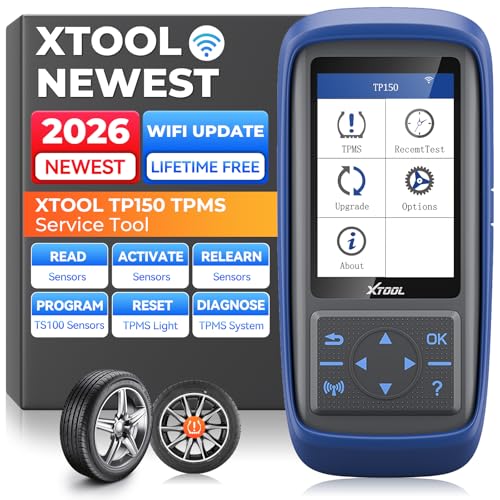
  • XTOOL TP150 Review: TPMS Activation, Programming, Relearn, and Diagnosis

    Research-based review: We have not hands-on tested this unit. Our assessment is based on XTOOL first-party documentation, current Amazon marketplace data, and comparison with other verified TPMS-service tools.

    XTOOL TP150 product image on Amazon
    Product image provided via Amazon Creators API. Image links to the relevant Amazon product page.

    Quick Verdict

    The XTOOL TP150 is a dedicated TPMS service tool, not a general full-system OBD2 scanner. XTOOL verifies TPMS sensor activation, programming, relearn, and system diagnosis, with support for 315 MHz and 433 MHz sensors. It can also display sensor ID, pressure, temperature, and battery condition on supported sensors. At our current Amazon snapshot of $159.00, it makes the most sense for users who actually service tire-pressure monitoring systems rather than buyers looking for broad engine, ABS, SRS, or bidirectional diagnostics.

    Affiliate disclosure: As an Amazon Associate, Scan Tool Compass earns from qualifying purchases.

    Check current XTOOL TP150 price on Amazon →

    Key Specifications

    Area Verified information
    Product class Dedicated TPMS service tool
    Sensor activation Supported TPMS sensor activation
    Programming XTOOL TS100 programmable sensors; up to eight in supported workflows
    Relearn TPMS relearn procedures documented
    Diagnosis TPMS system status and fault-code checks
    Frequencies 315 MHz and 433 MHz
    Sensor data ID, pressure, temperature, and battery condition on supported sensors
    Updates PC or Wi-Fi software update workflows documented
    Price snapshot $159.00 USD; time-sensitive

    What the TP150 Can Do

    XTOOL positions the TP150 around the complete TPMS service workflow: activate sensors, inspect their information, diagnose TPMS faults, program supported replacement sensors, and perform relearn procedures when the vehicle and sensor type are supported.

    That makes it fundamentally different from a basic OBD2 scanner. Its value is concentrated in tire-pressure monitoring work rather than broad vehicle diagnostics.

    Sensor Activation and Data

    XTOOL confirms TPMS activation for supported sensors and documents display of sensor ID, tire pressure, temperature, and sensor battery condition. Those data points can help identify a weak or failing sensor before replacing parts blindly.

    Coverage still varies by sensor type and vehicle, so the existence of 315 MHz and 433 MHz support should not be read as a guarantee for every TPMS sensor on the market.

    Programming: Know the Sensor Scope

    XTOOL specifically documents programming for its TS100 programmable sensors, including workflows that can program up to eight sensors. That is useful, but it is also an important limit.

    We do not describe the TP150 as a universal programmer for every aftermarket TPMS sensor. If you plan to use a different sensor brand, verify compatibility before purchasing.

    TPMS Relearn and Diagnosis

    XTOOL documents TPMS relearn procedures, including OBD and sensor-triggered workflows where supported. Relearn is the process that lets the vehicle recognize the correct sensor IDs or positions after sensor replacement, wheel rotation, or other TPMS service.

    The TP150 can also check TPMS status and fault codes. As with all vehicle-specific service functions, the exact workflow depends on the year, make, model, and TPMS design.

    Important Limitations

    • Not a broad scan tool: Buy it for TPMS work, not as a replacement for a full-system OBD2 scanner.
    • Programming scope matters: First-party documentation specifically verifies XTOOL TS100 programming, not universal programming of every sensor brand.
    • Coverage varies: Sensor activation and relearn depend on vehicle and sensor type.
    • TPMS-only value: If you rarely service sensors, a more general diagnostic tool may give you more everyday value.

    Best For

    • DIY users who regularly replace or service TPMS sensors.
    • Tire shops and small repair operations that need activation and relearn tools.
    • Users working with XTOOL TS100 programmable sensors.
    • People who need sensor pressure, temperature, ID, and battery-status information.

    Who Should Skip It

    Skip the TP150 if your main goal is Check Engine diagnosis, ABS/SRS scanning, full-system module access, or bidirectional component testing. This is a specialized TPMS tool. If TPMS is only an occasional issue, consider whether a broader scanner with limited TPMS functions better matches your workload.

    Related Buying Paths

    Start with our guide to what OBD2 scanners can actually diagnose if you are unsure whether your problem belongs to TPMS or another vehicle system. You can also browse the TPMS Tools category as more verified models are added.

    Related Reading

    Explore This Topic

    Methodology & Sources

    This review uses XTOOL first-party product pages and official product material. Programming, activation, and relearn coverage should be checked for the exact vehicle and sensor before purchase.

    • XTOOL TP150 official product page
    • XTOOL TP150 official product information
    • XTOOL TP150 official product flyer

    The Practical Takeaway

    The XTOOL TP150 has a clear job: TPMS activation, diagnosis, programming, and relearn. It is a strong fit when tire-pressure sensor work is common enough to justify a dedicated tool. Its biggest buying caveat is sensor-programming scope—XTOOL specifically verifies its TS100 ecosystem, so do not assume universal aftermarket sensor programming.

    Check current XTOOL TP150 availability on Amazon →

  • TOPDON ONE Review: Professional Full-System Diagnostics, Active Tests, and Subscription Caveats

    Research-based review: We have not hands-on tested this unit. Our assessment is based on TOPDON first-party documentation, current Amazon marketplace data, and comparison with other verified professional diagnostic platforms.

    TOPDON ONE product image on Amazon
    Product image provided via Amazon Creators API. Image links to the relevant Amazon product page.

    Quick Verdict

    The TOPDON ONE is a professional diagnostic platform aimed at repair shops and diagnostic specialists rather than casual Check Engine Light users. TOPDON verifies full-system diagnostics, live data, active tests, more than 50 maintenance functions, supported-brand ECU coding, topology mapping, and newer-vehicle gateway/communication support. At our current Amazon snapshot of $749.00, its value depends on whether you actually need those advanced workflows.

    The most important buying detail is the software model: TOPDON states that the first year of updates is free. After that, core EOBD functions, code read/clear, live data, active tests, and maintenance functions remain available, while some advanced capabilities require an active subscription.

    Affiliate disclosure: As an Amazon Associate, Scan Tool Compass earns from qualifying purchases.

    Check current TOPDON ONE price on Amazon →

    Key Specifications

    Area Verified information
    Product class Professional bidirectional diagnostic platform
    Diagnostics Full-system DTC read/clear and live data
    Bidirectional Active tests verified by TOPDON
    Maintenance 50+ maintenance functions documented for the ONE/ONE Lite platform
    ECU work ECU coding on supported vehicle brands
    Topology OE-level topology mapping verified
    Updates First year free; subscription affects selected advanced functions afterward
    Price snapshot $749.00 USD; time-sensitive

    What the TOPDON ONE Can Do

    TOPDON confirms full-system diagnostics, including reading and clearing diagnostic trouble codes and viewing live data across supported vehicle systems. The company also confirms active tests, which allow the tool to send commands to supported components rather than only reading information.

    That capability puts the ONE in the same general buying tier as other professional bidirectional platforms, not basic handheld OBD-II code readers.

    Active Tests and Maintenance Functions

    Active tests are one of the strongest verified reasons to consider this model. They can help a technician command supported components during diagnosis, but the exact tests depend on vehicle make, model, year, and module.

    TOPDON also documents more than 50 maintenance functions for the ONE/ONE Lite platform. That is a broad platform claim, not a promise that every listed procedure works on every vehicle. For any must-have reset or relearn, check the current TOPDON coverage information before purchasing.

    ECU Coding and Topology Mapping

    TOPDON confirms ECU coding for supported vehicle brands and OE-level topology mapping. These features matter most in professional workflows where a technician needs a clearer view of vehicle networks or supported coding/customization functions.

    Do not interpret “ECU coding” as universal ECU programming. The exact coding functions vary by vehicle, and some advanced features may require an internet connection or an active software subscription.

    The Subscription Detail You Should Understand

    TOPDON states that the first year of software updates is free. After that first year, core EOBD functions, reading and clearing DTCs, live data, active tests, and maintenance functions remain permanently available.

    TOPDON also states that selected advanced functions can require an active subscription after year one, including topology mapping, certain ECU coding/customization features, TopFix AI, security gateway access, and latest-vehicle updates. Buyers should factor that into long-term ownership cost.

    Important Limitations

    • Advanced functions vary by vehicle: Do not assume every active test, coding function, or maintenance procedure works on every car.
    • Some premium functions become subscription-gated: The first-year-free model does not mean every advanced function stays subscription-free forever.
    • Some features need internet access: Internet-dependent workflows may not be available offline.
    • Professional complexity: This is unnecessary if your needs stop at basic engine codes, readiness, or occasional ABS/SRS diagnosis.

    Best For

    • Independent repair shops and diagnostic specialists.
    • Technicians who need verified bidirectional active tests.
    • Users who benefit from topology mapping and supported ECU coding.
    • Workflows that regularly use many service and maintenance procedures.
    • Buyers willing to evaluate ongoing subscription needs after year one.

    Who Should Skip It

    Skip the TOPDON ONE if you mainly read Check Engine codes, monitor generic live data, or perform a handful of DIY service tasks. A lower-cost full-system or bidirectional scanner can be a better fit. You should also avoid buying it for one specific coding or active-test function until TOPDON confirms that exact function for your vehicle.

    Alternatives

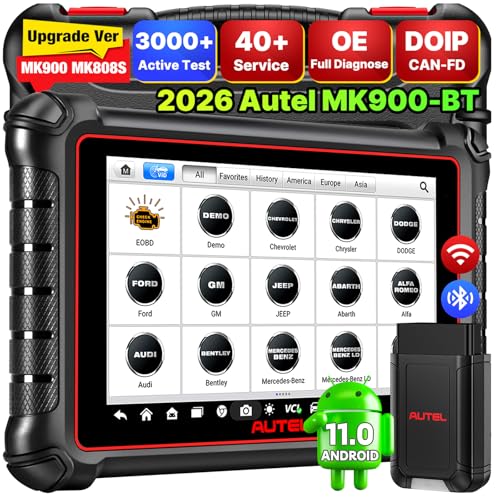
    The Autel MK900BT is another professional wireless bidirectional platform with verified active tests and newer-protocol support. The LAUNCH CRP919XBT offers full-system diagnostics, actuator tests, supported coding functions, CAN FD, and expandable DoIP. If your budget is lower, the TOPDON AD900 Lite provides verified full-system diagnostics and bidirectional control in a less expensive tier.

    Related Reading

    Explore This Topic

    Methodology & Sources

    This review uses TOPDON first-party product documentation for the ONE series. Vehicle-specific active tests, coding, maintenance functions, and subscription terms should be checked against current TOPDON coverage and plan information before purchase.

    • TOPDON ONE official product page
    • TOPDON ONE Series official information

    The Practical Takeaway

    The TOPDON ONE is a high-end diagnostic platform with verified full-system access, active tests, maintenance functions, supported ECU coding, and topology mapping. Its strongest fit is a professional user who will actually use that breadth. The subscription model is not a footnote—understand which advanced functions require renewal after the first year before deciding that the higher purchase price makes sense.

    Check current TOPDON ONE availability on Amazon →

  • LAUNCH CRP919XBT vs Autel MK900BT: Which Professional Bidirectional Scanner Fits Better?

    LAUNCH CRP919XBT vs Autel MK900BT: Which Professional Bidirectional Scanner Fits Better?

    Research-based comparison: We have not hands-on tested these professional scanners. This page uses first-party LAUNCH and Autel documentation, current Amazon price snapshots, and our verified product briefs. Exact active tests, coding, and service functions remain vehicle-specific.

    Quick Answer

    The LAUNCH CRP919XBT and Autel MK900BT are both advanced wireless full-system platforms with verified active-test capability and newer-protocol support. LAUNCH documents ECU coding, hidden-feature functions, programmable-module installation, CAN FD, expandable DoIP, FCA AutoAuth, and wireless DBSCar VII connectivity. Autel documents an 8-inch Android tablet, wireless VCI, active tests, broad service functions, DoIP, CAN FD, Smart AutoVIN, Wi-Fi/Bluetooth, and optional BT506 battery-tester compatibility.

    At the Amazon snapshots used here, the LAUNCH was listed at $475.14 and the Autel at $619.00. The lower LAUNCH price does not automatically make it the better tool; the decision depends on the exact vehicle functions, coding/service needs, and ecosystem you prefer.

    Affiliate disclosure: As an Amazon Associate, Scan Tool Compass earns from qualifying purchases.

    Check LAUNCH CRP919XBT on Amazon →
    Check Autel MK900BT on Amazon →

    LAUNCH CRP919XBT vs Autel MK900BT: Verified Comparison

    Area LAUNCH CRP919XBT Autel MK900BT
    Full-system diagnostics Verified Verified within Autel’s advanced diagnostic scope
    Bidirectional active tests Verified actuator tests Verified active tests
    Wireless vehicle connection DBSCar VII Bluetooth adapter Wireless VCI
    CAN FD Verified Verified
    DoIP Expandable DoIP support Verified DoIP support
    Security gateway FCA AutoAuth verified Not used as a verified comparison point here
    Coding / configuration ECU coding, hidden-feature functions, programmable-module installation listed; vehicle-specific Not generalized beyond Autel’s verified special/service functions in our brief
    Service / maintenance functions Advanced platform; exact list not used as a verified comparison point here Broad service/maintenance functions verified
    AutoVIN Not used as a verified comparison point here Smart AutoVIN verified
    Battery testing Not used as a verified comparison point here Optional BT506 compatibility; not built-in standalone battery testing
    Update terms Not confirmed in our first-party pass Autel store currently states one year free updates; time-sensitive
    Price snapshot $475.14 $619.00

    Where the LAUNCH CRP919XBT Stands Out

    LAUNCH confirms full-system fault diagnosis, actuator tests, wireless DBSCar VII connectivity, CAN FD, expandable DoIP, and FCA AutoAuth. It also lists ECU coding, hidden-feature functions, and programmable-module installation.

    The key caution is terminology. Coding and module installation should not be generalized into universal ECU software programming. The exact capabilities depend on vehicle make, model, year, module, and security requirements.

    Read our full LAUNCH CRP919XBT review.

    Where the Autel MK900BT Stands Out

    Autel confirms an 8-inch Android tablet with wireless VCI, code read/erase, live data, ECU information, active tests, special functions, DoIP, CAN FD, Smart AutoVIN, Wi-Fi, and Bluetooth. Autel also documents broad service/maintenance functions.

    Battery testing is an example of why our reviews separate built-in and accessory functions: Autel lists compatibility with the optional BT506 battery tester, so we do not claim the MK900BT alone is a complete battery analyzer.

    Read our full Autel MK900BT review.

    Which Is Better for Active Tests?

    Both have verified bidirectional capability, so the deciding factor is not simply whether they can perform active tests. The important question is whether the exact test you need is supported on your exact vehicle.

    Before purchasing either platform for a fan, pump, relay, solenoid, EVAP, HVAC, or body-control test, use the manufacturer’s current vehicle/function coverage information.

    Which Is Better for Coding?

    LAUNCH has the clearer coding documentation in our verified source set. LAUNCH explicitly lists ECU coding, hidden-feature functions, and programmable-module installation for supported vehicles.

    That still does not equal universal ECU programming. Buyers should separate configuration/coding functions from OEM software flashing and verify the intended module workflow before purchase.

    Which Is Better for Service Functions?

    Autel has the clearer broad service/maintenance statement in our verified MK900BT brief. The exact procedures still vary by vehicle, so a broad service-function platform should not be treated as proof that one specific reset or relearn works on your car.

    Price and Ownership Terms

    The LAUNCH was about $144 cheaper in the snapshot used here. However, ownership cost is not only purchase price. Software-update terms, optional accessories, security accounts, and the functions you actually need all affect long-term value.

    Autel’s official store currently states one year of free updates and one year of warranty for the MK900BT listing used in our verification. Those terms can change. We did not confirm a comparable LAUNCH free-update duration in the first-party sources used for this pass, so buyers should check current terms directly.

    Who Should Buy the LAUNCH CRP919XBT?

    • You want a lower snapshot price in this professional tier.
    • You need verified actuator tests and full-system diagnostics.
    • FCA AutoAuth, CAN FD, or expandable DoIP are relevant to your vehicles.
    • You have a specific supported coding/configuration workflow in mind.

    Who Should Buy the Autel MK900BT?

    • You prefer Autel’s 8-inch Android tablet and wireless VCI ecosystem.
    • You need full-system diagnostics, active tests, and broad service functions.
    • Smart AutoVIN and Autel’s accessory ecosystem are useful to you.
    • You understand the BT506 is optional for battery testing and that update terms are time-sensitive.

    Methodology & Sources

    • LAUNCH CRP919XBT official product information
    • LAUNCH official downloads
    • Autel MK900BT official product information
    • Autel official store listing

    The Practical Takeaway

    The LAUNCH CRP919XBT offers a lower current price and a strong verified set of full-system, active-test, coding-related, protocol, and FCA features. The Autel MK900BT costs more but offers Autel’s dedicated tablet ecosystem, active tests, broad service functions, Smart AutoVIN, DoIP/CAN FD, and accessory expansion. The correct choice depends on the exact vehicle functions you need—not which brand has the longer feature list.

  • Innova 5210 vs 5410: Is the Full-System Upgrade Worth It?

    Innova 5210 vs 5410: Is the Full-System Upgrade Worth It?

    Research-based comparison: We have not hands-on tested these scanners. This comparison uses first-party Innova documentation, current Amazon price snapshots, and our verified product briefs.

    Quick Answer

    The Innova 5210 is the better-value choice if you mainly need Check Engine and ABS code scanning, battery/charging-system testing, oil-light reset support, live data, and RepairSolutions2 app connectivity. The Innova 5410 is the clear upgrade if you need broader all-system diagnostics including SRS, transmission, and other supported vehicle systems, plus live-data graphing and report saving/export.

    At the Amazon snapshots used here, the 5210 was listed at $89.99 and the 5410 at $161.99. The extra cost buys broader verified module access rather than simply a more expensive version of the same basic scanner.

    Affiliate disclosure: As an Amazon Associate, Scan Tool Compass earns from qualifying purchases.

    Check Innova 5210 on Amazon →
    Check Innova 5410 on Amazon →

    Innova 5210 vs 5410: Verified Comparison

    Area Innova 5210 Innova 5410
    Check Engine diagnostics Verified Verified within broader system scope
    ABS diagnostics Verified Verified
    SRS / airbag diagnostics Innova indicates no Verified
    Transmission diagnostics Not a full-system tool Verified
    Other vehicle systems Limited All-system positioning; vehicle-dependent
    Live data Verified Verified
    Graphing / reports Not the main verified differentiator Graphing and report saving/export verified
    Battery/charging testing Verified Not used as a verified comparison point here
    Oil-light reset Verified in Innova comparison information Not used as a verified comparison point here
    Bidirectional Innova indicates no Do not assume broad bidirectional capability
    Software updates Not used as a verified comparison point here Free updates stated by Innova
    Price snapshot $89.99 $161.99

    Why the 5210 Is Enough for Many DIY Owners

    Innova confirms Check Engine and ABS scanning, live data, Mode 6/freeze-frame functions, readiness assistance, battery and charging-system testing, and oil-light reset support. It also connects to the RepairSolutions2 app over Bluetooth.

    That is a strong DIY package if your work is centered on engine/emissions issues, ABS faults, basic maintenance, and battery/charging checks.

    Innova is also clear about what the 5210 does not do: SRS airbag-code access, all-system scanning, BMS reset, ABS bleeding, EPB reset, and bidirectional system tests are not included according to the verified comparison information.

    Read our full Innova 5210 review.

    What the 5410 Adds

    The 5410 moves into the all-system tier. Innova confirms diagnostics across ABS, SRS, engine, transmission, and other supported vehicle systems. That makes it relevant when warning lights and faults extend beyond the engine and ABS modules.

    Innova also confirms live data and graphing plus report saving/export through its ecosystem. For a DIY user doing deeper diagnosis, those features can matter more than simply having more codes available.

    Read our full Innova 5410 review.

    When the 5210 Is the Better Buy

    Choose the 5210 if you do not need SRS, transmission, or broader module access. Paying nearly twice as much for the 5410 only makes sense when those additional systems are part of your actual diagnostic work.

    The 5210 also has a clear verified battery/charging-testing role and oil-light reset support, making it a practical owner-level tool rather than merely a cheaper scanner.

    When the 5410 Is Worth the Upgrade

    The 5410 becomes easier to justify when you regularly encounter ABS, SRS, transmission, and other manufacturer-specific modules. It is also a better fit when graphing and report export are part of your workflow.

    Use Innova’s Coverage Checker before buying, because “all-system” does not mean every function is available on every vehicle.

    Neither Should Be Assumed to Be Broadly Bidirectional

    Innova explicitly indicates the 5210 is not bidirectional. For the 5410, our verified source supports broad diagnostic access but does not justify describing it as a general bidirectional platform.

    If active tests are a buying requirement, compare verified Bidirectional Scan Tools instead.

    Who Should Buy the Innova 5210?

    • You mainly need Check Engine and ABS diagnostics.
    • You value battery and charging-system testing.
    • You want RepairSolutions2 app connectivity.
    • You want lower cost and do not need SRS/full-system access.

    Who Should Buy the Innova 5410?

    • You need SRS and transmission diagnostics in addition to engine/ABS.
    • You want broader all-system module access.
    • Graphing and report export matter to your diagnostic workflow.
    • You are willing to pay more for deeper coverage.

    Methodology & Sources

    • Innova 5210 official information
    • Innova scanner comparison information
    • Innova 5410 official information
    • Innova 5410 product page

    The Practical Takeaway

    The Innova 5210 is the smarter buy for typical DIY engine/ABS work, especially if battery testing and RepairSolutions2 appeal to you. The 5410 earns its higher price when you genuinely need SRS, transmission, broader system diagnostics, graphing, and reports. The upgrade is about diagnostic depth—not simply getting a newer-looking scanner.

  • Autel AL319 vs ANCEL AD310: Which $30 OBD2 Code Reader Is Better?

    Autel AL319 vs ANCEL AD310: Which $30 OBD2 Code Reader Is Better?

    Research-based comparison: We have not hands-on tested these code readers. This page uses first-party Autel and ANCEL documentation, current Amazon price snapshots, and our verified product briefs.

    Quick Answer

    The Autel AL319 and ANCEL AD310 are both low-cost, self-contained OBD-II readers for Check Engine diagnostics. Both have verified code read/clear, freeze-frame, live-data, and I/M-readiness functions. ANCEL’s verified documentation also explicitly lists EVAP testing and vehicle information, while Autel confirms generic and manufacturer-specific OBD-II code retrieval and live PCM data. At the snapshots used here, both were listed at $29.99, so the choice is mostly about documented feature details and brand preference—not a major price difference.

    Affiliate disclosure: As an Amazon Associate, Scan Tool Compass earns from qualifying purchases.

    Check Autel AL319 on Amazon →
    Check ANCEL AD310 on Amazon →

    Autel AL319 vs ANCEL AD310: Verified Comparison

    Area Autel AL319 ANCEL AD310
    Basic OBD-II code reading Verified Verified
    Code / MIL clearing Verified Verified
    Freeze frame Verified Verified
    Live data Live PCM data verified Live data verified
    I/M readiness Verified Verified
    EVAP test Not established in our verified AL319 brief Verified by ANCEL
    Vehicle information Not used as a verified comparison point here Verified by ANCEL
    ABS/SRS/full-system Not a verified capability Do not treat as ABS/SRS/full-system
    Bidirectional Not a verified capability Not a verified capability
    Current price snapshot $29.99 $29.99

    Where the Autel AL319 Fits

    Autel identifies the AL319 as an OBDII/CAN code reader and confirms generic and manufacturer-specific OBD-II code retrieval, MIL/code clearing, freeze frame, live PCM data, and I/M readiness. Autel also states compatibility with most 1996-and-newer OBD-II/CAN vehicles.

    That makes it a straightforward choice for engine/emissions diagnostics without phone apps or advanced module access.

    Read our full Autel AL319 review.

    Where the ANCEL AD310 Has a Slight Documentation Edge

    ANCEL confirms the same basic OBD-II foundation—code read/erase, live data, freeze frame, and I/M readiness—but its first-party page also explicitly lists EVAP testing and vehicle information. It also states that the scanner is powered from the OBD-II connector and does not require batteries.

    ANCEL publishes compatibility caveats as well, including a statement in the cited product page that hybrid/electric vehicles are not supported. That is a limitation worth checking if your vehicle falls into that category.

    Read our full ANCEL AD310 review.

    Which Is Better for a Check Engine Light?

    For basic code retrieval and clearing, both qualify. Neither has a meaningful verified advantage simply for reading a typical engine/emissions DTC.

    If you want the broader explicitly documented basic feature list, the AD310 has the edge in our source set because EVAP testing and vehicle information are directly confirmed. If you prefer Autel’s ecosystem and only need the core OBD-II functions, the AL319 remains a valid choice.

    Neither Is for ABS, Airbags, or Active Tests

    This is the most important buying boundary. These are entry-level OBD-II readers. Do not choose either one for ABS, SRS/airbag, full-system, or bidirectional diagnosis.

    If your warning light is outside the engine/emissions system, read Basic Code Reader vs Full-System Scanner before buying.

    Who Should Buy the Autel AL319?

    • You want a simple Autel-branded OBD-II reader.
    • You need codes, freeze frame, live PCM data, and readiness.
    • You do not need enhanced modules or service functions.

    Who Should Buy the ANCEL AD310?

    • You want the same low-price tier with a slightly broader explicitly verified basic feature list.
    • EVAP testing and vehicle information are useful to you.
    • You understand ANCEL’s published compatibility caveats.

    Methodology & Sources

    • Autel AL319 official product information
    • ANCEL AD310 official product information

    The Practical Takeaway

    At an equal $29.99 snapshot price, the decision is close. The ANCEL AD310 has the stronger explicitly documented feature list in our verification, while the Autel AL319 covers the core OBD-II jobs most beginner buyers need. If your diagnostic requirements extend beyond Check Engine/emissions work, neither is the right tool tier.

  • Autel MK900BT Review: Professional Wireless Bidirectional Scan Tool With CAN FD and DoIP

    Research-based review: We have not hands-on tested this unit. Our assessment is based on Autel documentation, current Amazon marketplace data, and comparison with other verified professional diagnostic platforms.

    Autel MK900BT product image on Amazon
    Product image provided via Amazon Creators API. Image links to the relevant Amazon product page.

    Quick Verdict

    The Autel MaxiCOM MK900BT is an 8-inch Android diagnostic tablet for technicians and advanced DIY users who need wireless VCI connectivity, full-system diagnostics, active tests, broad service functions, and support for newer protocols such as DoIP and CAN FD. Autel also confirms Smart AutoVIN plus Wi-Fi and Bluetooth connectivity. At our current Amazon snapshot of $619.00, it belongs in the professional-tool tier, not the “just read my Check Engine Light” category.

    Affiliate disclosure: As an Amazon Associate, Scan Tool Compass earns from qualifying purchases.

    Check current Autel MK900BT price on Amazon →

    Key Specifications

    Area Verified information
    Device 8-inch Android diagnostic tablet
    Vehicle connection Wireless VCI connectivity
    Core diagnostics Read/erase codes, live data, ECU information
    Bidirectional Active tests verified
    Service functions Broad service/maintenance functions verified by Autel
    Protocols DoIP and CAN FD support
    Vehicle identification Smart AutoVIN
    Connectivity Wi-Fi and Bluetooth
    Battery testing Compatible with optional BT506; not a built-in standalone battery-test claim
    Current store terms Autel store states one year free updates and one year warranty; time-sensitive
    Price snapshot $619.00 USD; time-sensitive

    What the MK900BT Can Do

    Autel confirms code reading and erasing, live data, ECU information, active tests, and special functions. That puts the MK900BT well beyond a passive code reader. It is designed to communicate with supported vehicle systems and, where supported, command components during diagnosis.

    Active tests are vehicle-specific. A scanner may offer a broad bidirectional platform while the exact fan, pump, relay, solenoid, or module tests vary by year, make, model, and system.

    Wireless Tablet Workflow

    The MK900BT uses an 8-inch Android tablet with wireless VCI connectivity. Autel also lists Wi-Fi and Bluetooth. This lets the technician keep the display separate from the diagnostic connector and move around the vehicle during testing.

    For users who work on several vehicles or spend long periods reading live data and reports, the dedicated tablet format can be easier than relying on a personal phone.

    DoIP, CAN FD, and Newer Vehicles

    Autel confirms support for DoIP and CAN FD. These communication technologies matter on newer vehicle platforms, but protocol support should not be confused with universal function coverage. The tool still needs software support for the exact vehicle and diagnostic function.

    Smart AutoVIN and Service Functions

    Autel lists Smart AutoVIN to assist vehicle identification and broad service/maintenance functions. The exact service procedures available vary by vehicle, so a buyer should check the function list for the specific year, make, and model rather than assuming every reset or relearn works universally.

    Battery Testing Requires the Optional BT506

    This is an important boundary. Autel lists compatibility with the optional BT506 battery tester. We therefore do not describe battery health testing as a built-in standalone MK900BT function. If battery analysis is important, budget for the compatible accessory and confirm the intended workflow.

    Important Limitations

    • Vehicle-specific active tests: Exact actuator tests vary by vehicle and module.
    • Service functions vary: Broad platform support does not guarantee every maintenance procedure on every car.
    • Battery testing needs an accessory: Do not treat the MK900BT itself as a complete battery analyzer without the BT506.
    • Update/warranty terms change: Autel’s store currently states one year of free updates and one year of warranty; check current terms before buying.
    • Price and complexity: This is unnecessary if your work stops at engine codes or basic ABS/SRS diagnostics.

    Best For

    • Technicians and advanced DIY users working across many vehicle systems.
    • Buyers who need verified active-test capability.
    • Users working with newer DoIP/CAN FD platforms.
    • People who prefer a dedicated wireless diagnostic tablet.
    • Workflows that benefit from Smart AutoVIN and broad service functions.

    Who Should Skip It

    Skip the MK900BT if you only need Check Engine codes, readiness, basic live data, or a few enhanced systems. A lower-priced scanner can do those jobs with less complexity. Also avoid buying it for a single active test or service procedure until you confirm that exact function for your vehicle.

    Alternatives and Upgrade Path

    The LAUNCH CRP919XBT is another advanced wireless full-system bidirectional platform with CAN FD, expandable DoIP, and FCA AutoAuth. The TOPDON AD900 Lite offers verified full-system diagnostics and bidirectional control at a lower price tier.

    If you mainly need broad module access without verified active tests, the Innova 5410 sits lower in the capability and price ladder.

    Related Reading

    Explore This Topic

    Methodology & Sources

    This review uses Autel’s official MK900BT product information, documentation, and current store terms. Time-sensitive update/warranty statements should be rechecked before purchase.

    • Autel MK900BT official product information
    • Autel official documentation
    • Autel official store listing

    The Practical Takeaway

    The Autel MK900BT is a serious diagnostic platform with full-system access, active tests, newer-protocol support, wireless VCI operation, and broad service functions. Its value appears when those capabilities are part of regular diagnostic work. For basic or occasional DIY scanning, it is more tool—and more cost—than most owners need.

    Check current Autel MK900BT availability on Amazon →

  • LAUNCH CRP919XBT Review: Full-System Bidirectional Diagnostics and Advanced Vehicle Support

    Research-based review: We have not hands-on tested this unit. Our assessment is based on LAUNCH documentation, current Amazon marketplace data, and comparison with other verified bidirectional platforms.

    LAUNCH CRP919XBT product image on Amazon
    Product image provided via Amazon Creators API. Image links to the relevant Amazon product page.

    Quick Verdict

    The LAUNCH CRP919XBT is a high-end bidirectional scan tool for advanced DIY users and technicians who need wireless vehicle communication, full-system fault diagnosis, actuator tests, and selected coding/configuration functions. LAUNCH also documents CAN FD, expandable DoIP, and FCA AutoAuth support. At our current Amazon snapshot of $475.14, it makes sense when these advanced capabilities match real repair work—not simply because the marketing feature list is long.

    Affiliate disclosure: As an Amazon Associate, Scan Tool Compass earns from qualifying purchases.

    Check current LAUNCH CRP919XBT price on Amazon →

    Key Specifications

    Area Verified information
    Tool class Bidirectional / advanced full-system scanner
    Vehicle connection Wireless DBSCar VII Bluetooth adapter
    Full-system diagnostics Verified by LAUNCH
    Actuator tests Verified
    Coding/configuration ECU coding, hidden-feature functions, programmable-module installation listed by LAUNCH; vehicle-specific
    Protocols/security CAN FD, expandable DoIP, FCA AutoAuth support
    Update terms Not confirmed in our first-party verification pass
    Price snapshot $475.14 USD; time-sensitive

    What the CRP919XBT Can Do

    LAUNCH confirms full-system fault diagnosis and actuator-test capability. Those two features are the core reason to step up from a simple code reader or four-system scanner. Full-system access gives the tool a path into manufacturer-specific modules on supported vehicles, while bidirectional active tests let the scanner send commands to supported actuators during diagnosis.

    Active tests can be valuable when a fault requires more than passively reading data, but the exact tests available vary by vehicle and module. Verify the function you need rather than assuming the word “bidirectional” means every possible actuator command.

    Wireless Diagnostic Workflow

    LAUNCH lists wireless vehicle communication through the DBSCar VII Bluetooth adapter. That separates the diagnostic tablet/interface from the OBD connector and can be convenient when moving around a vehicle during testing.

    Wireless communication is a workflow advantage, not a diagnostic guarantee. Coverage still comes from the software and the exact vehicle.

    Coding and Programming Claims Need Care

    LAUNCH lists ECU coding, hidden-feature functions, and installation of programmable modules. These are meaningful advanced capabilities, but they should not be generalized into “universal ECU programming.”

    Coding, adaptation, programmable-module installation, and full ECU software programming are not interchangeable. The exact function depends on make, model, year, module, account access, and sometimes OEM procedures.

    CAN FD, DoIP, and FCA AutoAuth

    LAUNCH documents CAN FD support, expandable DoIP, and FCA AutoAuth support. These features matter on newer platforms that use newer communication protocols or security gateways.

    Again, protocol support does not automatically prove every diagnostic function on every vehicle. It means the platform has the communication capability needed for supported workflows.

    Important Limitations

    • Vehicle-specific active tests: Exact actuator tests vary by supported vehicle/module.
    • Coding is not universal programming: Do not interpret LAUNCH’s coding claims as blanket ECU programming.
    • Update/subscription terms: We did not confirm the free-update duration in the first-party sources used for this pass, so buyers should check current terms before purchase.
    • High price: This tool is difficult to justify if you only need Check Engine, ABS, or basic live data.

    Best For

    • Advanced DIY users working across multiple vehicle systems.
    • Technicians who need full-system diagnostics and active tests.
    • Buyers who need newer-protocol support such as CAN FD or expandable DoIP.
    • Users who specifically need verified LAUNCH coding/configuration workflows on supported vehicles.

    Who Should Skip It

    Skip the CRP919XBT if your real need is a Check Engine reader or a simple four-system scanner. A lower-cost tool may solve the job with less complexity. Also skip it if you are buying solely for one coding or programming function that you have not verified for your exact vehicle.

    Alternatives and Upgrade Path

    The TOPDON AD900 Lite is a lower-priced full-system bidirectional tablet with a clearly documented set of eight service functions. The Autel MK900BT is another professional-level wireless bidirectional platform with DoIP and CAN FD support.

    For a lower-cost mobile-device approach, compare the XTOOL A30M.

    Related Reading

    Explore This Topic

    Methodology & Sources

    This review uses LAUNCH’s first-party product and download information. We keep active tests, coding, and vehicle coverage conditional and do not convert coding terminology into a universal ECU-programming claim.

    • LAUNCH CRP919XBT official product information
    • LAUNCH official downloads

    The Practical Takeaway

    The LAUNCH CRP919XBT is built for buyers who genuinely need full-system diagnostics, active tests, wireless operation, and selected coding/configuration workflows. It is overkill for basic OBD-II work, but it can be a strong fit when newer protocols, FCA security access, and advanced module interaction are part of the actual job.

    Check current LAUNCH CRP919XBT availability on Amazon →

  • Innova 5410 Review: Full-System Diagnostics, Live Data, and Reporting for DIY Repair

    Research-based review: We have not hands-on tested this unit. Our assessment is based on Innova documentation, current Amazon marketplace data, and comparison with nearby verified scanners.

    Innova 5410 product image on Amazon
    Product image provided via Amazon Creators API. Image links to the relevant Amazon product page.

    Quick Verdict

    The Innova 5410 is a full-system OBD2 scanner for DIY users who need broader module access than a basic code reader. Innova confirms diagnostics across ABS, SRS, engine, transmission, and other supported vehicle systems, plus live data, graphing, report saving/export, and free software updates. At our current Amazon snapshot of $161.99, it fits buyers who want broad diagnostic visibility without jumping straight to a high-end bidirectional tablet.

    Affiliate disclosure: As an Amazon Associate, Scan Tool Compass earns from qualifying purchases.

    Check current Innova 5410 price on Amazon →

    Key Specifications

    Area Verified information
    Tool class All-system / full-system OBD2 scanner
    Systems ABS, SRS, engine, transmission, and other supported vehicle systems
    Live data Verified
    Graphing Verified
    Reports Saving/export through Innova ecosystem
    Software updates Free updates stated by Innova
    Bidirectional Not assumed; must be separately verified per function/vehicle
    Price snapshot $161.99 USD; time-sensitive

    What the Innova 5410 Can Do

    The main reason to choose the 5410 over an entry-level scanner is module depth. Innova positions it as an all-system OBD2 scanner and confirms diagnostics across ABS, SRS, engine, transmission, and additional supported vehicle systems.

    That matters when a warning light sits outside the standardized engine/emissions layer. A basic code reader can be excellent for a Check Engine Light while still being unable to communicate with an airbag or ABS module. The 5410 is designed for the broader diagnostic layer.

    Live Data, Graphing, and Reports

    Innova confirms live data and graphing along with report saving/export through its ecosystem. Those features are useful when diagnosis requires more than reading a static DTC. Watching data change under different operating conditions can help narrow a fault—but only when the data is interpreted with the correct vehicle context.

    Our OBD2 Live Data guide explains why one sensor number by itself rarely tells the whole story.

    Important Limitations

    • Vehicle coverage varies: Innova explicitly says not all features are supported by all vehicles.
    • Use the Coverage Checker: A broad “all-system” label does not guarantee every module/function on every year and model.
    • Do not assume bidirectional control: Our verified source does not justify calling the 5410 broadly bidirectional.
    • Service functions are function-specific: Verify the exact reset/relearn you need rather than assuming all-system access includes it.

    Best For

    • DIY owners diagnosing multiple warning-light systems.
    • Users who need ABS, SRS, engine, and transmission access in one tool.
    • Buyers who value live data, graphing, and saved reports.
    • People who want broader diagnostics without moving immediately to a professional tablet.

    Who Should Skip It

    Skip the 5410 if all you need is a Check Engine code reader; a much cheaper basic scanner can handle that job. Also skip it if your primary requirement is verified bidirectional active tests—choose a scanner whose manufacturer explicitly confirms the active-test functions you need.

    Alternatives and Upgrade Path

    If you only need Check Engine and ABS plus battery testing, the Innova 5210 may be enough. If you want verified bidirectional control, compare tools in our Bidirectional Scan Tools category.

    For a simpler explanation of tool tiers, read Basic Code Reader vs Full-System Scanner.

    Related Reading

    Compare: Innova 5410 vs 5610

    Explore This Topic

    Methodology & Sources

    This review uses Innova’s official 5410 product information. We keep vehicle-specific capabilities conditional and do not convert “all-system” into a claim that every module and function works on every supported vehicle.

    • Innova 5410 official information
    • Innova CarScan Diagnostics 5410 product page

    The Practical Takeaway

    The Innova 5410 is a sensible middle step between basic readers and advanced bidirectional tablets. Its value comes from broad system access, live data, graphing, and reporting. The buying rule remains the same: use Innova’s Coverage Checker for the exact year, make, model, and function before purchasing.

    Check current Innova 5410 availability on Amazon →

  • OBDLink CX Review: Bluetooth BLE OBD2 Adapter for iOS, Android, and BimmerCode

    Research-based review: We have not hands-on tested this adapter. Our assessment is based on OBDLink documentation, current Amazon marketplace data, and comparison with other verified Bluetooth OBD2 adapters.

    OBDLink CX product image on Amazon
    Product image provided via Amazon Creators API. Image links to the relevant Amazon product page.

    Quick Verdict

    The OBDLink CX is a premium Bluetooth 5.1 BLE adapter aimed at drivers who want a compact phone-based diagnostic platform, especially when BimmerCode compatibility matters. OBDLink confirms iOS and Android support, generic diagnostics through the OBDLink app, live parameter monitoring, Check Engine Light clearing, documented CAN/ISO/KWP protocols, and lifetime firmware upgrades. At our current Amazon snapshot of $79.95, the key value is the adapter-and-app ecosystem—not a promise of universal coding or all-system diagnostics.

    Affiliate disclosure: As an Amazon Associate, Scan Tool Compass earns from qualifying purchases.

    Check current OBDLink CX price on Amazon →

    Key Specifications

    Area Verified information
    Connection Bluetooth 5.1 BLE
    Mobile platforms iOS and Android
    Generic diagnostics Live parameters, generic OBD-II diagnostics, Check Engine clearing through OBDLink app
    BimmerCode OBDLink positions CX for BimmerCode-supported vehicles/features
    Protocols OBDLink documents supported CAN/ISO/KWP protocols
    Firmware Lifetime firmware upgrades stated by OBDLink
    Price snapshot $79.95 USD; time-sensitive

    What the OBDLink CX Can Do

    At the standardized OBD-II level, OBDLink’s own app can monitor live parameters, perform generic diagnostics, and clear the Check Engine Light. That covers the common phone-based workflow of reading engine faults, watching data, and using a mobile interface instead of carrying a dedicated handheld scanner.

    OBDLink also positions the CX for BimmerCode and states support for vehicles and features supported by BimmerCode. That is an important distinction: the adapter provides the communication hardware, while the app and vehicle determine what manufacturer-specific functions are actually available.

    Bluetooth 5.1 BLE Matters

    The CX uses Bluetooth Low Energy rather than Classic Bluetooth. OBDLink confirms iOS and Android support. For buyers choosing between Bluetooth adapters, this platform detail matters because not every adapter uses the same connection method or supports the same phone operating systems.

    If you are comparing phone-based tools more broadly, read Bluetooth vs Wired OBD2 Scanners.

    Important Limitations

    • App-dependent enhanced functions: Manufacturer-specific coding and diagnostics depend on the app and supported vehicle.
    • Not universal BMW coding: BimmerCode positioning does not mean every BMW/MINI feature is supported on every vehicle.
    • Not automatically a full-system scanner: Do not treat the adapter alone as proof of universal ABS/SRS/body-module access.
    • BLE workflow: The CX uses BLE rather than Classic Bluetooth, which matters for app/device compatibility.

    Best For

    • iPhone or Android users who want a quality Bluetooth adapter.
    • BimmerCode users who have already checked vehicle/app compatibility.
    • Drivers who want live parameter monitoring and generic OBD-II diagnostics on a phone.
    • Buyers who value lifetime firmware upgrades from the adapter manufacturer.

    Who Should Skip It

    Skip the CX if you want a self-contained scanner with its own display, or if you need guaranteed multi-brand full-system diagnostics without relying on app support. Buyers who need broad Ford/GM network support should also compare the OBDLink MX+, whose verified network support is broader in our source set.

    Alternatives and Upgrade Path

    The Veepeak OBDCheck BLE+ is a lower-cost generic OBD-II option. The OBDLink MX+ costs more but has verified Ford MS-CAN and GM SW-CAN support plus a broader documented OBDLink ecosystem.

    For a direct value comparison in the Bluetooth category, see Veepeak OBDCheck BLE+ vs OBDLink MX+.

    Related Reading

    Explore This Topic

    Methodology & Sources

    This review uses OBDLink’s official CX product and support documentation. App-specific capabilities are kept conditional because the selected software and vehicle determine enhanced functions.

    • OBDLink CX official product page
    • OBDLink CX official support
    • OBDLink CX adapter notes

    The Practical Takeaway

    The OBDLink CX is a strong fit when you deliberately want a BLE phone-based adapter and understand that enhanced functions live in the app-and-vehicle combination. Its BimmerCode positioning and lifetime firmware upgrades are useful differentiators, but buyers should not confuse app compatibility with universal coding or all-system coverage.

    Check current OBDLink CX availability on Amazon →