Blog

  • Best TPMS Tools: XTOOL TP150, THINKCAR VENU90, and GEARWRENCH GWTPMS

    Best TPMS Tools: XTOOL TP150, THINKCAR VENU90, and GEARWRENCH GWTPMS

    Research-based buying guide: These TPMS picks are based on verified first-party feature sets and limitations. We have not hands-on tested every sensor/vehicle combination.

    Affiliate disclosure: As an Amazon Associate I earn from qualifying purchases.

    Quick Picks

    Tool Best for Verified strength Key limitation
    XTOOL TP150 General TPMS activation/programming/relearn 315/433 MHz, activation, TS100 sensor programming, relearn and diagnosis Coverage depends on vehicle/sensor support
    THINKCAR VENU90 Standalone THINKCAR TPMS workflow Activation, supported programming/relearn, independent operation Programming/relearn support varies by sensor ecosystem
    GEARWRENCH GWTPMS Shops using GEARWRENCH sensors 315/433 MHz, activation, relearn, code diagnostics, GEARWRENCH sensor setup Direct sensor setup is limited to GEARWRENCH-branded sensors

    Best All-Around Verified TPMS Workflow: XTOOL TP150

    The XTOOL TP150 is the broadest general-purpose choice in our current verified TPMS set. XTOOL confirms sensor activation, TS100 programming, relearn procedures, diagnosis, and both 315 MHz and 433 MHz operation.

    Check XTOOL TP150 on Amazon

    Best Standalone THINKCAR Option: VENU90

    The THINKCAR VENU90 is designed as an independent TPMS activation and diagnostic tool. THINKCAR lists sensor activation, supported programming, relearn workflows, and 315/433 MHz support for its tire-pressure sensor ecosystem.

    Check THINKCAR VENU90 on Amazon

    Best Fit for GEARWRENCH Sensor Users: GWTPMS

    The GEARWRENCH GWTPMS combines activation, relearn, TPMS code read/clear, sensor data, and support for both major frequencies. Its defining limitation is important: GEARWRENCH states direct sensor setup/programming is for GEARWRENCH-branded TPMS sensors, so it should not be marketed as a universal programmer for every third-party sensor.

    Check GEARWRENCH GWTPMS on Amazon

    Do You Need a Dedicated TPMS Tool?

    A general OBD2 scanner may advertise a “TPMS reset,” but that is not the same as a dedicated tool that can activate sensors, read sensor information, perform supported relearns, or program compatible replacement sensors. If your work regularly involves tire-pressure sensors, a dedicated TPMS tool usually offers a clearer workflow.

    How We Selected These Tools

    We required first-party evidence for dedicated TPMS activation/diagnostic workflows. We also separate sensor programming/setup claims from relearn and activation because those capabilities are not interchangeable and may depend on sensor brand and vehicle support.

    Related Reading

  • Autel AL519 Review: All 10 OBD2 Modes Plus Charging and Battery Checks

    Research-based review: This article is based on Autel first-party documentation and current Amazon catalog data. We have not hands-on tested this unit.

    Affiliate disclosure: As an Amazon Associate I earn from qualifying purchases.

    Autel AL519 product image on Amazon
    Product image provided via Amazon Creators API. Image links to the relevant Amazon product page.

    Quick Verdict

    The Autel AL519 is a focused OBD2 code reader for buyers who want all 10 standardized OBD-II test modes plus useful electrical and battery-related checks. Autel confirms live data, freeze frame, I/M readiness, graphing, charging/start-system diagnostics, and discharged-battery condition checks. The key limitation is simple: this is not an ABS/SRS/full-system or bidirectional scanner.

    Check current Autel AL519 price on Amazon

    Key Specifications

    Diagnostic scope Standardized OBD-II/EOBD
    OBD modes All 10 OBD-II test modes
    Data Live PCM data, freeze frame, graphing
    Emissions One-click I/M readiness
    Electrical / battery 12V charging, starting-system and discharged-battery checks
    Current Amazon price snapshot* $59.99

    *Price and availability can change.

    What It Can Do

    Autel confirms the AL519 supports all 10 standardized OBD-II modes, including code reading/clearing, live data, freeze frame, readiness checks, O2-related data, vehicle information, and Mode 6 diagnostics.

    The AL519 also stands out among basic readers because Autel lists 12V charging-system, starting-system, and discharged-battery diagnostics. That gives it more electrical troubleshooting value than a bare-bones Check Engine Light reader.

    Important Limitations

    • Engine/OBD2 focused: do not treat AL519 as an ABS, SRS, transmission-enhanced, all-system, or bidirectional scanner.
    • OBD-II compliance matters: compatibility depends on the vehicle supporting the relevant standardized protocols.
    • Electrical tests do not equal full battery-shop analysis: match the tool to the depth of battery testing you actually need.

    Best For

    • DIY owners who want a capable wired OBD2 reader with data graphing.
    • Drivers preparing for emissions/readiness checks.
    • Users who also want basic 12V charging/start-system diagnostics.

    Who Should Skip

    • Anyone needing ABS/SRS/module diagnostics.
    • Users who need active tests or service resets.
    • Buyers who prefer a Bluetooth/app workflow.

    Alternatives

    For a lower-cost basic Autel option, see the Autel AL319. For ABS plus battery testing, compare the Autel AL549 or our battery-testing buying guide.

    View Autel AL519 on Amazon

    Explore This Topic

    Methodology & Sources

    We used Autel’s official AL519 product page, official store listing, and user-manual resources to verify scope and features. Amazon data is used only for the current product listing and price context.

  • OBDLink EX Review: Wired FORScan Adapter for Ford and Standard OBD2

    Research-based review: This article is based on OBDLink first-party documentation and current Amazon catalog data. We have not hands-on tested the adapter with every FORScan workflow.

    Affiliate disclosure: As an Amazon Associate I earn from qualifying purchases.

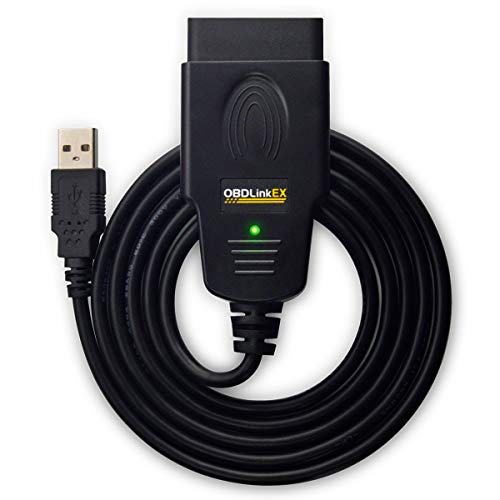
    OBDLink EX product image on Amazon
    Product image provided via Amazon Creators API. Image links to the relevant Amazon product page.

    Quick Verdict

    The OBDLink EX is a wired USB OBD2 adapter aimed primarily at Windows users and FORScan workflows, especially Ford-family diagnostics. It supports standardized OBD-II plus Ford MS-CAN access and is a strong fit when connection stability matters more than wireless convenience. It is not an iOS adapter and advanced functions come from compatible software such as FORScan rather than from the cable alone.

    Check current OBDLink EX price on Amazon

    Key Specifications

    Connection USB 2.0
    Primary platform Windows; Android possible with USB OTG
    OBD2 scope All legislated OBD-II protocols
    Ford-specific network MS-CAN support
    Software emphasis FORScan / OBDwiz and compatible software
    Current Amazon price snapshot* $69.95

    *Price and availability are time-sensitive.

    What It Can Do

    OBDLink designed EX around FORScan and Windows. The adapter supports standardized OBD-II on compliant vehicles and adds Ford-specific MS-CAN network access that can expose more Ford-family modules when used with compatible software.

    The manufacturer also highlights an electronic network switch and high-throughput wired connection, making EX more about reliability and software access than portability.

    Important Limitations

    • Not wireless: this is a USB adapter, not Bluetooth or Wi-Fi.
    • No iOS support: OBDLink’s platform guidance does not position EX as an iPhone/iPad adapter.
    • Advanced functions are software-dependent: FORScan capabilities should not be described as built-in standalone EX features.
    • Android requires USB OTG: a compatible OTG connection is needed.

    Best For

    • Ford owners using FORScan on Windows.
    • Users who prefer a wired connection for long diagnostic sessions.
    • DIYers who want standardized OBD-II support plus Ford MS-CAN access.

    Who Should Skip

    • iPhone/iPad users.
    • Buyers who want a wireless phone adapter.
    • Users who want a self-contained handheld scanner with its own screen.

    Alternatives

    For wireless multi-platform use, see our OBDLink MX+ review. For BMW-focused BLE use, see the OBDLink CX. Our OBDLink guide explains how the current models fit together.

    View OBDLink EX on Amazon

    Explore This Topic

    Methodology & Sources

    We used OBDLink’s official EX product page, support documentation, and platform/app guidance. Amazon data is used only for current listing and price context. Software-dependent functions remain conditional on the selected app and vehicle.

  • GEARWRENCH GWTPMS Review: TPMS Activation, Relearn, Diagnostics, and Sensor Limits

    Research-based review: This article is based on GEARWRENCH first-party documentation and current Amazon catalog data. We have not hands-on tested the tool on every supported vehicle or sensor type.

    Affiliate disclosure: As an Amazon Associate I earn from qualifying purchases.

    GEARWRENCH GWTPMS product image on Amazon
    Product image provided via Amazon Creators API. Image links to the relevant Amazon product page.

    Quick Verdict

    The GEARWRENCH GWTPMS is a dedicated TPMS service tool for buyers who need sensor activation, relearn, TPMS code diagnostics, and setup of GEARWRENCH-branded sensors. It supports both 315 MHz and 433 MHz workflows and comes with lifetime software updates. The main limitation is that direct sensor setup is not universal across every third-party sensor brand.

    Check current GEARWRENCH GWTPMS price on Amazon

    Key Specifications

    Tool type Dedicated TPMS service and diagnostic tool
    Frequencies 315 MHz and 433 MHz
    TPMS functions Activation, relearn, code read/clear, sensor information
    Sensor setup GEARWRENCH-branded TPMS sensors
    Display 4-inch color display
    Updates Free lifetime software updates
    Current Amazon price snapshot* $138.44

    *Price snapshots change.

    What It Can Do

    GEARWRENCH confirms the GWTPMS can activate TPMS sensors, perform relearn workflows, read and clear TPMS trouble codes, and display sensor information including ID, position, pressure, temperature, and battery status on supported vehicles.

    The tool supports 315 MHz and 433 MHz sensor workflows and can configure GEARWRENCH-branded sensors. GEARWRENCH also lists batch setup for multiple supported sensors.

    Important Limitations

    • Sensor setup is brand-limited: GEARWRENCH states direct setup is for GEARWRENCH-branded sensors; do not assume universal support for every third-party sensor.
    • Coverage varies: not every vehicle supports every relearn/diagnostic workflow.
    • This is not a general scan tool: it is built around TPMS service, not engine/all-system diagnostics.

    Best For

    • Shops regularly installing or servicing TPMS sensors.
    • Users who want a standalone TPMS tool instead of relying on a general scanner’s limited TPMS reset function.
    • Buyers working with GEARWRENCH programmable sensors.

    Who Should Skip

    • Drivers who only need to read Check Engine Light codes.
    • Buyers who require universal setup of arbitrary third-party TPMS sensors.
    • Users who only need an occasional TPMS reset and already own a compatible diagnostic scanner.

    Alternatives

    Compare the XTOOL TP150 and THINKCAR VENU90 if you want other dedicated TPMS workflows.

    View GEARWRENCH GWTPMS on Amazon

    Explore This Topic

    Methodology & Sources

    We used the official GEARWRENCH GWTPMS product page, user-manual resources, and current diagnostic-tool documentation. Amazon data is used only for the current product listing and price context.

  • MUCAR BT200 MAX Review: Full-System Bluetooth Diagnostics and Active Tests

    Research-based review: This article uses MUCAR first-party product information and current Amazon catalog data. We have not hands-on tested every function on a vehicle.

    Affiliate disclosure: As an Amazon Associate I earn from qualifying purchases.

    MUCAR BT200 MAX product image on Amazon
    Product image provided via Amazon Creators API. Image links to the relevant Amazon product page.

    Quick Verdict

    The MUCAR BT200 MAX is one of the more aggressive value propositions in our verified set: a phone-based Bluetooth adapter with full-system diagnostics, bidirectional active tests, 15+ maintenance resets, CAN-FD, and lifetime updates. Its strength is feature density for the price; its caveat is that almost every advanced function is vehicle-dependent and the workflow relies on a compatible mobile device/app.

    Check current MUCAR BT200 MAX price on Amazon

    Key Specifications

    Form factor Bluetooth OBD adapter + mobile app
    Verified diagnostic scope Full-system diagnostics
    Active tests Verified bidirectional control
    Maintenance functions 15+ listed resets/services
    Protocols / app support CAN-FD; ELM327-compatible app support
    Platforms Android / iOS
    Updates MUCAR states lifetime free updates
    Current Amazon price snapshot* $123.49

    *Price and availability can change.

    What It Can Do

    MUCAR confirms full-system diagnostics and bidirectional control for the BT200 MAX. That puts it well beyond a basic code reader: on supported vehicles, the adapter/app can access multiple modules and command supported components for active testing.

    MUCAR also lists 15+ maintenance resets, CAN-FD support, and compatibility with ELM327-style third-party apps. The first-party page also positions the device for both Android and iOS.

    Important Limitations

    • Coverage varies by vehicle: active tests and resets are not universal.
    • App-dependent workflow: you need a compatible phone/tablet and the appropriate software.
    • Marketing counts are not guarantees: broad active-test or vehicle-coverage numbers should not be treated as exact support for your car.
    • Check compatibility first: MUCAR provides vehicle/function lookup and should be consulted before purchase.

    Best For

    • DIY users who want full-system access without buying a dedicated tablet.
    • Users who specifically want bidirectional testing at a relatively low hardware cost.
    • Owners comfortable using a smartphone as the primary diagnostic interface.

    Who Should Skip

    • Users who want a self-contained diagnostic tablet.
    • Buyers who need guaranteed vehicle-specific coding or service functions without checking coverage.
    • Technicians who prefer a more traditional wired shop tool.

    Alternatives

    For a dedicated professional tablet, compare the MUCAR 892BT. For another low-cost app-based bidirectional option, see the TOPDON TopScan Lite and XTOOL A30D.

    View MUCAR BT200 MAX on Amazon

    Explore This Topic

    Methodology & Sources

    We used MUCAR’s official BT200 MAX product page and first-party launch documentation to verify the product family, full-system scope, active-test capability, maintenance functions, protocols, and update policy. Amazon data is used for current listing/price context only.

  • TOPDON ArtiDiag600 S Review: Four-System Diagnostics, 9 Services, and Key Limits

    Research-based review: This article is based on TOPDON first-party documentation and current Amazon catalog data. We have not hands-on tested this unit.

    Affiliate disclosure: As an Amazon Associate I earn from qualifying purchases.

    TOPDON AD600S product image on Amazon
    Product image provided via Amazon Creators API. Image links to the relevant Amazon product page.

    Quick Verdict

    The TOPDON ArtiDiag600 S (AD600S) is a good fit for DIY owners and small shops that need more than generic OBD2 but do not need an all-system or bidirectional platform. Its verified scope is four-system diagnosis—engine, transmission, ABS, and SRS—plus CAN-FD, AutoVIN, live data, reports, and nine maintenance functions. The biggest limitation is equally clear: this is not an all-system or active-test scanner.

    Check current TOPDON ArtiDiag600 S price on Amazon

    Key Specifications

    Verified diagnostic scope Engine, transmission, ABS, SRS
    Protocol highlight CAN-FD
    Maintenance functions 9 verified services
    Vehicle identification AutoVIN
    Updates TOPDON states lifetime free software updates
    Current Amazon price snapshot* $186.19

    *Price snapshots change. Confirm current price and availability at Amazon.

    What It Can Do

    TOPDON explicitly positions the ArtiDiag600 S as a four-system scanner. That means it can diagnose supported engine, transmission, ABS, and airbag/SRS systems rather than being limited to Check Engine Light work.

    The manufacturer also lists live-data viewing, AutoVIN, diagnostic-report generation, CAN-FD support, and nine maintenance functions: oil reset, brake reset, SAS reset, BMS reset, ABS bleeding, injector coding, ETS reset, DPF reset, and TPMS reset.

    Important Limitations

    • Not all-system: do not buy it expecting access to every module in the vehicle.
    • Not verified as bidirectional: the first-party page we reviewed does not position AD600S as an active-test tool.
    • Service coverage varies: nine listed functions do not mean every function works on every make/model/year.
    • Vehicle coverage must be checked: modern protocol support does not guarantee every system on every car.

    Best For

    • DIY owners who need ABS/SRS/transmission diagnostics beyond generic OBD2.
    • Buyers who want a dedicated handheld/tablet-style tool instead of a phone adapter.
    • Users who value lifetime updates and a defined maintenance-service set.

    Who Should Skip

    • Technicians who need full-system scanning across every supported ECU.
    • Users who specifically need bidirectional component activation.
    • Buyers who need advanced coding/programming workflows.

    Alternatives

    If you want a similar four-system focus with a different service mix, see our LAUNCH CRP123X V3.0 review and FOXWELL NT614 Elite review. If active tests are mandatory, move to our Best Bidirectional Scan Tools guide.

    View TOPDON ArtiDiag600 S on Amazon

    Explore This Topic

    Methodology & Sources

    Capability claims were checked against TOPDON’s official ArtiDiag600 S product page and first-party documentation. Amazon is used only for the current product listing, price snapshot, and affiliate destination. Vehicle-specific support should be confirmed with TOPDON before purchase.

  • Best OBD2 Scanners for ABS & SRS: Verified Four-System and All-System Picks

    Best OBD2 Scanners for ABS & SRS: Verified Four-System and All-System Picks

    Research-based buying guide: These picks are based on manufacturer-verified ABS/SRS or broader system coverage, not hands-on testing of every model.

    Affiliate disclosure: As an Amazon Associate I earn from qualifying purchases.

    Quick Picks

    Tool Best for Verified scope
    FOXWELL NT604 Four-system diagnostics without extra service emphasis Engine, ABS, SRS, transmission; live data and AutoVIN
    FOXWELL NT614 Elite Four-system diagnosis + oil/EPB service Engine, transmission, ABS, SRS plus verified oil reset and EPB
    LAUNCH CRP123X V3.0 Four-system diagnostics with added special functions Engine, transmission, ABS, SRS, AutoVIN and seven verified special functions
    Innova 5410 Broader all-system DIY work ABS, SRS, engine, transmission and other supported systems
    Innova SD35 Tablet-style all-system workflow Comprehensive system scanning including engine, ABS, SRS and TPMS on supported vehicles

    Best Straightforward Four-System Pick: FOXWELL NT604

    The FOXWELL NT604 is a focused choice when the requirement is engine, ABS, SRS and transmission diagnostics without paying for broader all-system or bidirectional functionality.

    Check FOXWELL NT604 on Amazon

    Best FOXWELL Step Up: NT614 Elite

    The NT614 Elite keeps the four-system scope and adds verified oil-reset and EPB functions. Those service functions do not turn it into an all-system or bidirectional scanner.

    Check FOXWELL NT614 Elite on Amazon

    Best Midrange Alternative: LAUNCH CRP123X V3.0

    The CRP123X V3.0 also targets engine, transmission, ABS and SRS diagnostics while adding AutoVIN and seven verified special functions. Vehicle-specific support should be checked before relying on any one service routine.

    Check LAUNCH CRP123X V3.0 on Amazon

    Choose Innova 5410 or SD35 When You Want Broader System Coverage

    The Innova 5410 and SD35 move beyond a fixed four-system emphasis toward broader all-system scanning on supported vehicles. That broader label still does not guarantee every module or service function on every car.

    Check Innova 5410 on Amazon · Check Innova SD35 on Amazon

    ABS/SRS Access Is Not the Same as Bidirectional Control

    Reading and clearing ABS/SRS faults is diagnostic access. Bidirectional tools can additionally command supported vehicle components for active tests. If active testing is a requirement, see our Best Bidirectional Scan Tools guide instead.

    How We Selected These Tools

    Every pick required first-party evidence for ABS/SRS or broader system access. We keep vehicle-specific support conditional, label narrower four-system tools separately from all-system tools, and do not infer active-test capability where it was not verified.

    Related Reading

  • Best OBD2 Scanners With Battery Testing: 4 Verified Picks

    Best OBD2 Scanners With Battery Testing: 4 Verified Picks

    Research-based buying guide: We selected these tools from models whose relevant diagnostic and battery functions were verified from manufacturer documentation. We have not hands-on tested every product.

    Affiliate disclosure: As an Amazon Associate I earn from qualifying purchases.

    Quick Picks

    Tool Best for Verified battery-related role
    FOXWELL NT301 Plus Low-cost OBD2 + battery checks 12V battery testing alongside generic OBD2 diagnostics
    ANCEL AD410 PRO DIY owners wanting broader battery/OBD2 workflow Battery-related testing plus OBD2 diagnostics in a dedicated handheld tool
    Innova 5210 ABS + battery/charging diagnostics Battery and charging-system testing plus engine/ABS diagnostics
    Autel AL549 ABS + battery testing on a focused handheld Battery test function plus generic OBD2 and ABS code access

    Best Budget Pick: FOXWELL NT301 Plus

    The NT301 Plus is the clearest entry-level option here when the goal is standard OBD2 engine diagnostics plus a 12V battery-testing workflow. It does not become an ABS/SRS/full-system scanner just because it adds battery testing.

    Check FOXWELL NT301 Plus on Amazon

    Best for ABS + Battery/Charging Checks: Innova 5210

    The Innova 5210 combines engine diagnostics, ABS access, live data, and battery/charging-system testing. That makes it a stronger fit than a basic code reader when brake-system codes and charging-system troubleshooting are both common jobs.

    Check Innova 5210 on Amazon

    Autel AL549: Another Focused ABS + Battery Option

    The Autel AL549 also combines standardized OBD2 work, ABS code access, and battery testing. Its verified scope is still narrower than an all-system scanner, so it makes more sense for focused DIY troubleshooting than maximum module coverage.

    Check Autel AL549 on Amazon

    Where the ANCEL AD410 PRO Fits

    The ANCEL AD410 PRO is another dedicated handheld choice for buyers who want battery-related functions alongside OBD2 diagnostics without moving to a tablet platform.

    Check ANCEL AD410 PRO on Amazon

    What Battery Testing Does Not Tell You

    A scan tool with battery functions is not automatically a professional battery analyzer, and battery testing does not imply ABS, SRS, transmission, full-system, or bidirectional capability. Match the scanner to the diagnostic systems you actually need.

    How We Selected These Tools

    We required first-party evidence for the relevant diagnostic/battery role and excluded products where the feature scope was unclear. Prices and availability are time-sensitive; use the linked review for model-specific limitations before buying.

    Related Guides

  • THINKCAR Scan Tools Guide: THINKSCAN 662, 689BT, and VENU90

    THINKCAR Scan Tools Guide: THINKSCAN 662, 689BT, and VENU90

    Research-based brand guide: This page summarizes THINKCAR models we have verified from manufacturer documentation and current marketplace data. It is not a hands-on brand ranking.

    Quick Answer

    Our verified THINKCAR set now covers three different use cases: THINKSCAN 662 for four-system diagnostics plus active tests and 12 service functions, THINKSCAN 689BT for a wireless all-system professional workflow with coding and 35+ services, and VENU90 as a dedicated TPMS activation/programming/relearn tool rather than a general diagnostic scanner.

    THINKCAR Models We Have Verified

    Model Best fit Verified scope Current price snapshot*
    THINKSCAN 662 Midrange bidirectional diagnostics ECM/TCM/ABS/SRS diagnostics, active tests, 12 services, CAN FD, lifetime updates $175.99
    THINKSCAN 689BT Professional wireless diagnostics All-system diagnosis, active tests, ECU coding, 35+ services, CAN FD/DoIP, FCA AutoAuth $474.86
    VENU90 Standalone TPMS work TPMS activation, supported sensor programming and relearn workflows; 315/433 MHz THINKCAR sensors $199.99

    *Price snapshots are time-sensitive.

    Which THINKCAR Tool Should You Choose?

    THINKSCAN 662 for a lower-cost active-test workflow

    The THINKSCAN 662 is the value-oriented diagnostic option in our current THINKCAR set. It combines four-system diagnosis with bidirectional active tests and 12 verified service functions, but vehicle/function coverage must still be checked.

    THINKSCAN 689BT for broader professional coverage

    The THINKSCAN 689BT moves to a wireless all-system platform with active tests, supported ECU coding, 35+ maintenance functions, CAN FD, DoIP and FCA AutoAuth. THINKCAR states lifetime free updates for supported vehicle brands.

    VENU90 when the job is TPMS, not general diagnostics

    The VENU90 is a separate category of tool. It is designed around TPMS activation, programming and relearn workflows and can operate independently for its core TPMS tasks.

    Useful THINKCAR Comparisons

    What THINKCAR Buyers Should Not Assume

    • Bidirectional and coding functions vary by exact vehicle.
    • Large service-function counts do not guarantee every function on every car.
    • VENU90 is not a substitute for a full-system diagnostic scanner.
    • TPMS programming/relearn coverage depends on the vehicle and sensor ecosystem.

    Methodology

    We use THINKCAR first-party product pages and support information as the primary sources for capability claims. Current Amazon data is used for time-sensitive price and availability context. We do not claim hands-on testing unless it actually occurs.

  • MUCAR Scan Tools Guide: 892BT vs 892BT PRO

    MUCAR Scan Tools Guide: 892BT vs 892BT PRO

    Research-based brand guide: This page summarizes MUCAR models we have verified from manufacturer documentation and current marketplace data. It is not a hands-on brand ranking.

    Quick Answer

    Our current verified MUCAR set covers two professional wireless scanners: the 892BT for full-system diagnostics, active tests, coding, 35+ service functions and lifetime updates, and the 892BT PRO for buyers who specifically want the added first-party claims around topology mapping, J2534 pass-through/OEM access, and a more advanced shop workflow.

    MUCAR Models We Have Verified

    Model Best fit Verified scope Current price snapshot*
    892BT Professional wireless diagnostics Full-system diagnosis, active tests, ECU coding, 35+ maintenance functions, CAN FD/DoIP $499.98
    892BT PRO Advanced shop workflow Full-system diagnosis, active tests, coding, topology, J2534 pass-through/OEM access, CAN FD/DoIP $799.98

    *Price snapshots are time-sensitive.

    Which MUCAR Scanner Should You Choose?

    892BT when you want the core professional feature set

    The 892BT already covers the major professional needs we verified: full-system diagnostics, bidirectional tests, supported ECU coding, 35+ maintenance functions, modern protocols, and lifetime free updates.

    892BT PRO when topology and J2534 matter

    The 892BT PRO adds first-party claims around OE topology mapping, AI-assisted diagnostics and J2534 pass-through/OEM access. J2534 capability does not mean OEM software, accounts, subscriptions or every programming workflow are included for free.

    Useful MUCAR Comparisons

    What MUCAR Buyers Should Not Assume

    • ECU coding and active tests are not universal across every vehicle.
    • 35+ service functions do not mean every function is available on every car.
    • J2534 pass-through does not make all OEM programming free or automatic.
    • Vehicle-specific gateway, coding and service coverage should be verified before purchase.

    Methodology

    We use MUCAR first-party product/store documentation as the primary evidence for capability claims, with current Amazon data used for price and availability context. We do not claim hands-on testing unless it actually occurs.

  • TOPDON Scan Tools Guide: TopScan Lite, ArtiDiag800 BT 2, AD900 Lite, and ONE Compared

    TOPDON Scan Tools Guide: TopScan Lite, ArtiDiag800 BT 2, AD900 Lite, and ONE Compared

    Research-based brand guide: This page summarizes TOPDON models we have verified from manufacturer documentation and current marketplace data. It is not a hands-on brand ranking.

    Quick Answer

    TOPDON’s verified range on Scan Tool Compass covers very different ownership models: TopScan Lite for low-cost app-based full-system and bidirectional diagnostics with subscription-gated advanced features, ArtiDiag800 BT 2 for a wireless tablet with 28+ service functions, AD900 Lite / ArtiDiag900 Lite for a larger tablet with eight verified services and two years of updates, and TOPDON ONE for professional shops needing topology, coding, and broader advanced functions.

    TOPDON Models We Have Verified

    Model Best fit Verified scope Current price snapshot*
    TopScan Lite Low-cost phone-based diagnostics Full-system diagnosis, bidirectional tests, eight services; advanced functions subscription-based after included access $51.98
    ArtiDiag800 BT 2 Wireless midrange tablet Full-system diagnostics, active tests, 28+ services, CAN FD, FCA access, Bluetooth 5.0 $298.95
    AD900 Lite / ArtiDiag900 Lite Tablet diagnostics with a focused service set Full-system diagnosis, bidirectional control, eight verified service functions, no IMMO $299.25
    TOPDON ONE Professional repair shops Full-system diagnostics, active tests, 50+ maintenance functions, supported ECU coding and topology mapping $749.00

    *Price snapshots are time-sensitive.

    Which TOPDON Scanner Should You Choose?

    TopScan Lite for the cheapest route into advanced diagnostics

    The TopScan Lite is inexpensive because the phone/app does much of the interface work. The important ownership caveat is subscription structure: TOPDON keeps a narrower set of core functions free, while several advanced functions require paid renewal after the included access period.

    ArtiDiag800 BT 2 for a wireless midrange tablet

    The ArtiDiag800 BT 2 moves to a dedicated Android tablet with wireless diagnosis, active tests and a much broader list of service functions. Exact service and gateway support remains vehicle-dependent.

    AD900 Lite when you want a tablet with a clearly defined service set

    The AD900 Lite has a verified eight-service package, bidirectional control and two years of free software updates. TOPDON’s documentation also makes an important limitation explicit: IMMO functionality is not included.

    TOPDON ONE for professional depth

    The TOPDON ONE targets professional shops with topology mapping, active tests, supported ECU coding and 50+ maintenance functions. Some advanced functions become subscription-dependent after the first year, while core diagnostic functions remain available.

    Useful TOPDON Comparisons

    What TOPDON Buyers Should Not Assume

    • “Bidirectional” does not mean every active test works on every vehicle.
    • TopScan Lite’s advanced feature set is not permanently free.
    • AD900 Lite does not include IMMO according to TOPDON documentation.
    • ECU coding on TOPDON ONE is supported-vehicle dependent and should not be described as universal programming.

    Methodology

    We use TOPDON first-party product pages, manuals and support documentation for capability and ownership-term claims, with current Amazon data used for time-sensitive price and availability context. We do not claim hands-on testing unless actually performed.

  • XTOOL Scan Tools Guide: A30D, A30M V2.0, and D7S Compared

    XTOOL Scan Tools Guide: A30D, A30M V2.0, and D7S Compared

    Research-based brand guide: This page summarizes XTOOL models we have verified from manufacturer documentation and current marketplace data. It is not a hands-on brand ranking.

    Quick Answer

    In our current verified XTOOL set, the A30D is the lower-cost mobile-app path into full-system diagnostics and bidirectional tests, the A30M V2.0 is another compact wireless full-system option with version-specific caveats, and the D7S is the dedicated professional tablet step up with broader service functions, CAN FD/DoIP support, and a longer included update period.

    XTOOL Models We Have Verified

    Model Best fit Verified scope Current price snapshot*
    A30D Budget mobile bidirectional diagnostics Full-system diagnosis, active tests, 19+ service functions, iOS/Android app workflow $89.31
    A30M V2.0 Compact wireless full-system diagnostics Full-system diagnostics and bidirectional functions; version naming requires care $151.00
    D7S Professional tablet workflow Full-system diagnostics, active tests, 39+ special functions, CAN FD and DoIP $469.00

    *Price snapshots are time-sensitive.

    Which XTOOL Scanner Should You Choose?

    A30D for a low-cost phone/tablet workflow

    The A30D is attractive when you want full-system diagnosis and active tests without paying for a dedicated diagnostic tablet. The tradeoff is that it depends on a compatible iOS/Android device and app workflow.

    A30M V2.0 when you want another compact wireless option

    The A30M V2.0 also sits in the compact wireless category. Our first-party source confirms the A30M family’s full-system and bidirectional scope, but version-specific claims must stay conservative because the manufacturer page reviewed did not explicitly use the marketplace “V2.0” suffix.

    D7S when you want a dedicated professional tablet

    The D7S is a different ownership class: XTOOL confirms a 7-inch Android platform, active tests, 39+ special functions, CAN FD/DoIP, and three years of free upgrades. ECU coding support is not universal across all brands.

    Useful XTOOL Comparisons

    What XTOOL Buyers Should Not Assume

    • Bidirectional capability does not mean every active test is available on every vehicle.
    • Service-function counts do not guarantee every listed function on a specific car.
    • A30M marketplace version naming should not be used to invent version-specific features.
    • D7S ECU coding is limited to supported workflows and should not be described as universal ECU programming.

    Methodology

    We use XTOOL first-party product pages and verified model documentation as the primary evidence for capability claims. Current Amazon data is used for price and availability context. We do not claim hands-on testing unless it actually occurs.