Blog

  • Innova Scan Tools Guide: 3040RS, 5210, 5410, SD35, and 5610 Compared

    Innova Scan Tools Guide: 3040RS, 5210, 5410, SD35, and 5610 Compared

    Research-based brand guide: This page summarizes Innova models we have verified from manufacturer documentation and current marketplace data. It is not a hands-on brand ranking.

    Quick Answer

    Innova’s verified range now spans from 3040RS for engine + ABS diagnostics, through the 5210 with battery/charging checks, into the 5410 and SD35 for broader all-system work, and up to the 5610 when verified bidirectional active tests are required.

    Innova Models We Have Verified

    Model Best fit Verified scope Current price snapshot*
    3040RS Engine + ABS diagnostics Engine and ABS code diagnostics; RepairSolutions2 ecosystem $104.99
    5210 DIY users wanting ABS + battery checks Engine, ABS, live data, battery/charging tests $89.99
    5410 Broader all-system diagnosis ABS, SRS, engine, transmission and other supported systems $161.99
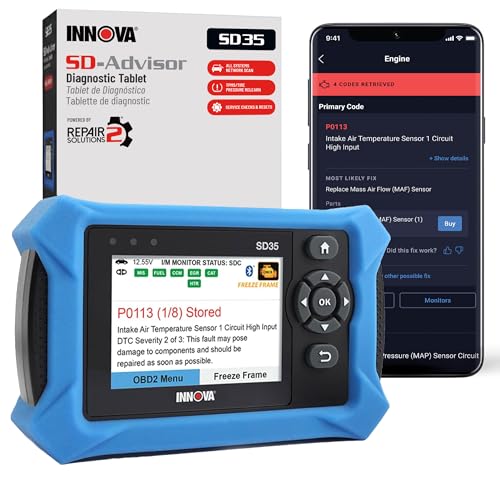
    SD35 Tablet-style all-system workflow Comprehensive system scanning including engine, ABS, SRS and TPMS on supported vehicles $149.99
    5610 Advanced DIY / bidirectional work All-system diagnostics, active tests and supported special functions $349.99

    *Price snapshots are time-sensitive.

    Which Innova Scanner Should You Choose?

    3040RS and 5210 for focused DIY work

    The 3040RS is a simple engine + ABS step up. The 5210 adds a useful battery and charging-system workflow without moving into all-system or bidirectional territory.

    5410 or SD35 for broader module coverage

    The 5410 and SD35 are the better fit when broader vehicle-system scanning matters. Exact module and function support remains vehicle-dependent.

    5610 when active tests matter

    The 5610 is the first model in our verified Innova set where bidirectional active testing is explicitly confirmed. Innova still requires coverage checking for the exact systems, tests, and special functions available on a specific vehicle.

    Useful Innova Comparisons

    What Innova Buyers Should Not Assume

    • “All-system” does not mean every module or service function is available on every vehicle.
    • ABS access does not automatically imply SRS, transmission, or active-test support.
    • The 5610’s bidirectional capability is vehicle- and function-dependent.
    • Innova’s 5610 documentation is region-specific for U.S./Canada use; avoid assuming identical support elsewhere.

    Methodology

    We use Innova first-party product pages and coverage guidance as the primary source for capability claims, with current Amazon data used for price and availability context. We do not claim hands-on testing unless performed.
  • FOXWELL Scan Tools Guide: NT301, NT301 Plus, NT604, NT604 Elite, and NT614 Elite

    FOXWELL Scan Tools Guide: NT301, NT301 Plus, NT604, NT604 Elite, and NT614 Elite

    Research-based brand guide: This page summarizes FOXWELL models we have verified from manufacturer documentation and current marketplace data. It is not a hands-on brand ranking.

    Quick Answer

    FOXWELL’s verified range on Scan Tool Compass now covers five useful steps: NT301 for basic OBD2, NT301 Plus for OBD2 plus 12V battery testing, NT604 and NT604 Elite for four-system diagnostics, and NT614 Elite when verified oil-reset and EPB functions matter.

    FOXWELL Models We Have Verified

    Model Best fit Verified scope Current price snapshot*
    NT301 Basic DIY diagnostics Engine/OBD2 codes and I/M readiness $57.99
    NT301 Plus Basic OBD2 + battery checks Generic OBD2 diagnosis plus 12V battery testing $79.98
    NT604 Four-system diagnostics Engine, ABS, SRS, transmission; live data and AutoVIN $135.96
    NT604 Elite Four-system shoppers wanting the Elite package Engine, transmission, ABS, SRS on supported vehicles $169.99
    NT614 Elite Four-system + selected service functions Engine, transmission, ABS, SRS; oil reset and EPB verified $155.99

    *Price snapshots are time-sensitive and can change.

    Which FOXWELL Scanner Should You Choose?

    NT301 vs NT301 Plus

    Choose the NT301 if you only need standard engine/emissions diagnostics. Choose the NT301 Plus if adding a 12V battery-testing workflow is useful. Neither should be treated as an ABS/SRS/full-system scanner.

    Move to the NT604 family for four-system access

    The NT604 and NT604 Elite step up to engine, ABS, SRS, and transmission diagnostics on supported vehicles.

    Choose the NT614 Elite when oil-reset and EPB support matter

    The NT614 Elite keeps the verified four-system scope and adds oil-light reset and EPB service functions. That is still different from an all-system or bidirectional platform.

    Useful FOXWELL Comparisons

    What FOXWELL Buyers Should Not Assume

    • Higher model numbers do not automatically mean all-system diagnostics.
    • Four-system access is not the same as bidirectional active tests.
    • NT301 Plus battery testing does not turn it into a broader module scanner.
    • Service functions and module support vary by vehicle.

    Methodology

    Our FOXWELL coverage is built from first-party documentation, verified model-specific reviews, and current Amazon data used only for time-sensitive price/availability context. We do not claim hands-on testing unless we actually perform it.

  • Innova SD35 vs 5410: Which All-System Scanner Fits Your DIY Workflow?

    Innova SD35 vs 5410: Which All-System Scanner Fits Your DIY Workflow?

    Research-based comparison: We have not hands-on tested these scanners. This comparison uses Innova first-party documentation, current Amazon snapshots, and our verified product briefs. Vehicle-specific coverage remains conditional.

    Quick Answer

    The Innova SD35 and Innova 5410 are both positioned as broader diagnostic tools than basic code readers. The SD35 has a clear verified emphasis on all-system scanning that includes Check Engine, ABS, SRS, and TPMS on supported vehicles. The 5410 has verified all-system diagnostics across ABS, SRS, engine, transmission, and other supported systems, plus live-data graphing and report saving/export.

    At our current Amazon snapshots, the SD35 was $149.99 and the 5410 $161.99. Prices change.

    Affiliate disclosure: As an Amazon Associate, Scan Tool Compass earns from qualifying purchases.

    Check Innova SD35 on Amazon →
    Check Innova 5410 on Amazon →

    Innova SD35 vs 5410: Verified Comparison

    Area SD35 5410
    All-system positioning Verified Verified
    Check Engine / engine Verified Verified
    ABS Verified Verified
    SRS / airbags Verified Verified
    Transmission Not used as a specific differentiator in our SD35 brief Verified
    TPMS Explicitly highlighted by Innova Not used as a specific differentiator in our 5410 brief
    Live data Verified Verified
    Graphing Not used as a verified differentiator here Verified
    Report saving/export Not used as a verified differentiator here Verified through Innova ecosystem
    Software updates Not used as a verified differentiator here Innova states free software updates
    Bidirectional active tests Not verified Do not call bidirectional without vehicle-specific confirmation
    Price snapshot $149.99 $161.99

    Why the SD35 May Fit Better

    The SD35 has a strong verified value case for buyers who want broad system scanning at the lower current price. Innova explicitly highlights Check Engine, ABS, SRS, and TPMS support on compatible vehicles, which can make it especially relevant when TPMS diagnostics are part of the buying reason.

    Read our full Innova SD35 review.

    Why the 5410 May Fit Better

    The 5410’s verified advantage is diagnostic workflow depth. Innova confirms live-data graphing plus report saving/export, in addition to all-system diagnostics that include engine, transmission, ABS, SRS, and other supported systems.

    If you regularly compare data or want to save/share diagnostic reports, the small current price premium can make sense.

    Read our full Innova 5410 review.

    “All Systems” Still Requires a Coverage Check

    Neither model should be purchased solely because the phrase “all systems” appears in product positioning. Innova explicitly warns that features vary by vehicle. Check the exact year, make, and model before assuming access to a particular module or special function.

    Neither Should Be Assumed Bidirectional

    Our verified source set does not establish the SD35 as a bidirectional scanner, and the 5410 should not be called bidirectional unless a specific active function is confirmed for the target vehicle. If active testing is essential, choose a platform where the manufacturer explicitly verifies it.

    Who Should Buy the SD35?

    • You want the lower current price.
    • You want broad system scanning with explicit ABS, SRS, and TPMS coverage on supported vehicles.
    • You need live data but do not specifically require verified graphing/report-export features.

    Who Should Buy the 5410?

    • You want all-system diagnostics with explicit engine/transmission/ABS/SRS coverage.
    • You value live-data graphing.
    • You want report saving/export capability.
    • You value Innova’s stated free software updates.

    Methodology & Sources

    This comparison uses Innova first-party product information. Exact module and function support should be checked with Innova’s vehicle coverage resources.

    • Innova SD35 official product page
    • Innova 5410 official product page

    The Practical Takeaway

    The SD35 is the stronger current-price choice for broad diagnostics with explicitly highlighted TPMS support. The 5410 earns its small premium if live-data graphing, report export, and its verified system mix better match your workflow.

  • TOPDON ONE vs MUCAR 892BT PRO: Professional Scanner Features and Subscription Costs

    TOPDON ONE vs MUCAR 892BT PRO: Professional Scanner Features and Subscription Costs

    Research-based comparison: We have not hands-on tested these platforms. This comparison uses TOPDON and MUCAR first-party documentation, current Amazon snapshots, and our verified product briefs. Advanced functions remain vehicle-dependent.

    Quick Answer

    The TOPDON ONE and MUCAR 892BT PRO are both high-end professional diagnostic platforms with verified full-system diagnostics, bidirectional controls, ECU coding, topology mapping, and broad maintenance functions. The biggest verified ownership difference is software policy: TOPDON states the first year of updates is free and some advanced functions require a subscription afterward, while MUCAR states lifetime free updates with no subscription fees for the 892BT PRO.

    MUCAR also explicitly lists J2534 pass-through, CAN-FD, and DoIP. TOPDON verifies modern gateway/communication support but our current brief does not use those exact protocol names as differentiators.

    At our current Amazon snapshots, the TOPDON ONE was $749.00 and the MUCAR 892BT PRO $799.98. Prices change.

    Affiliate disclosure: As an Amazon Associate, Scan Tool Compass earns from qualifying purchases.

    Check TOPDON ONE on Amazon →
    Check MUCAR 892BT PRO on Amazon →

    TOPDON ONE vs MUCAR 892BT PRO: Verified Comparison

    Area TOPDON ONE MUCAR 892BT PRO
    Full-system diagnostics Verified Verified
    Bidirectional / active tests Verified Verified
    ECU coding Verified on supported brands Verified; vehicle-dependent
    Topology mapping OE-level topology verified OE topology mapping verified
    Maintenance functions 50+ documented for ONE/ONE Lite platform 35+ documented
    J2534 pass-through Not used as a verified differentiator in our brief Verified
    CAN-FD / DoIP Modern communication support verified generally CAN-FD and DoIP explicitly listed
    Update policy First year free; some advanced functions subscription-gated afterward Lifetime free updates; no subscription fees stated
    Price snapshot $749.00 $799.98

    Why the TOPDON ONE May Fit Better

    The TOPDON ONE has a strong verified professional feature set with full-system diagnostics, active tests, more than 50 maintenance functions, supported-brand ECU coding, and topology mapping. Its lower current snapshot price also helps.

    The tradeoff is the post-year-one software model. TOPDON states that core diagnostics, live data, active tests, and maintenance functions remain available, but selected advanced functions—including topology mapping and certain coding/customization features—can require an active subscription.

    Read our full TOPDON ONE review.

    Why the MUCAR 892BT PRO May Fit Better

    MUCAR’s most compelling verified advantage is the ownership model: lifetime free updates with no subscription fees stated for the 892BT PRO. MUCAR also explicitly lists J2534 pass-through/OEM access, CAN-FD, and DoIP.

    That can make the higher upfront price easier to justify for users who expect to keep the platform for years and regularly work with newer vehicle communications or OEM pass-through workflows.

    Read our full MUCAR 892BT PRO review.

    J2534 Does Not Mean Free OEM Programming

    MUCAR’s J2534 support is meaningful, but it does not make OEM programming free. Manufacturer software, subscriptions, login accounts, or paid programming access may still be required. Treat J2534 as a compatible interface, not an all-inclusive programming package.

    Which Has the Better Long-Term Software Cost?

    Based on the manufacturers’ current statements, MUCAR has the clearer long-term cost advantage because it advertises lifetime free updates and no subscription fees. TOPDON’s model is more nuanced: many core functions remain permanently available, but some advanced capabilities require subscription renewal after the first year.

    Who Should Buy the TOPDON ONE?

    • You want the lower current purchase price.
    • You need full-system diagnostics, active tests, coding, and topology mapping.
    • You are comfortable evaluating subscription needs after year one.
    • You value a platform with 50+ documented maintenance functions.

    Who Should Buy the MUCAR 892BT PRO?

    • You want lifetime free updates with no subscription fees stated.
    • You need J2534 pass-through/OEM access.
    • You value explicit CAN-FD and DoIP support.
    • You regularly use professional bidirectional, topology, coding, and maintenance workflows.

    Methodology & Sources

    This comparison uses first-party TOPDON and MUCAR documentation. Vehicle-specific coding, active tests, and service procedures should always be confirmed before purchase.

    • TOPDON ONE official product page
    • TOPDON ONE Series information
    • MUCAR official diagnostic tools collection

    The Practical Takeaway

    Choose the TOPDON ONE if its lower current price and broad professional toolset outweigh the later subscription model. Choose the MUCAR 892BT PRO if J2534, explicit CAN-FD/DoIP support, and lifetime free updates matter enough to justify the higher upfront price.

  • Innova 3040RS vs 5210: Which Engine and ABS Scanner Is the Better Value?

    Innova 3040RS vs 5210: Which Engine and ABS Scanner Is the Better Value?

    Research-based comparison: We have not hands-on tested these scanners. This comparison uses Innova first-party documentation, current Amazon snapshots, and our verified product briefs. Vehicle coverage remains conditional.

    Quick Answer

    Both the Innova 3040RS and Innova 5210 have verified Engine and ABS diagnostics. The 5210 has the broader verified feature set in our current source record: live data, Mode 6/freeze-frame functions, emissions/readiness assistance, battery and charging-system testing, oil-light reset, and Bluetooth RepairSolutions2 connectivity. The 3040RS has a simpler verified scope and Innova explicitly states no subscription and no update fees.

    At our current Amazon snapshots, the 3040RS was $104.99 and the 5210 $89.99. Prices change.

    Affiliate disclosure: As an Amazon Associate, Scan Tool Compass earns from qualifying purchases.

    Check Innova 3040RS on Amazon →
    Check Innova 5210 on Amazon →

    Innova 3040RS vs 5210: Verified Comparison

    Area 3040RS 5210
    Engine diagnostics Verified Verified
    ABS diagnostics Verified Verified
    Code read/erase Verified Verified within Check Engine/ABS scope
    Live data Not used as a verified differentiator here Verified
    Mode 6 / freeze frame Not used as a verified differentiator here Verified
    Battery / charging tests Not verified in our 3040RS brief Verified
    Oil-light reset Not verified in our 3040RS brief Verified
    RepairSolutions2 Access verified Bluetooth app connectivity verified
    SRS / all-system Not verified Explicitly not provided according to Innova comparison information
    Bidirectional tests Not verified Not provided according to Innova comparison information
    Subscription/update fees Innova states none Not used as a differentiator in our current brief
    Price snapshot $104.99 $89.99

    Why the 5210 Is the Stronger Feature Value

    In our verified source set, the 5210 offers a broader list of confirmed functions while also carrying the lower current snapshot price. Battery/charging tests and oil reset are especially useful additions for a DIY owner.

    Read our full Innova 5210 review.

    Where the 3040RS Still Fits

    The 3040RS remains a focused Engine + ABS scanner with RepairSolutions2 access. Its strongest ownership point in our verified brief is Innova’s explicit statement that the product has no subscription or update fees.

    If you prefer a narrower FixAssist workflow and those ownership terms matter, it remains a valid choice.

    Read our full Innova 3040RS review.

    Neither Is a Full-System or Bidirectional Tool

    Do not choose between these models if your actual problem is SRS airbags, broad transmission/body diagnostics, full-system module access, or active tests. The 5210 specifically lacks SRS, all-system scanning, and bidirectional system tests according to Innova’s comparison information; the 3040RS is verified only for Engine + ABS in our brief.

    Which Is Better for Battery and Charging Diagnostics?

    The 5210 has the clear verified advantage because Innova confirms battery and charging-system testing. We do not have equivalent first-party confirmation in the current 3040RS brief.

    Who Should Buy the 3040RS?

    • You want focused Engine + ABS diagnostics.
    • You value Innova’s stated no-subscription/no-update-fee ownership.
    • You use the RepairSolutions2 ecosystem.

    Who Should Buy the 5210?

    • You want Engine + ABS plus live data and freeze-frame/Mode 6 functions.
    • You want battery and charging tests.
    • You want oil-light reset support on compatible vehicles.
    • You want the stronger current feature-to-price case based on our verified data.

    Methodology & Sources

    This comparison uses Innova first-party product pages and our existing verified briefs. Features still depend on the exact vehicle.

    • Innova 3040RS official product page
    • Innova 5210 official product page

    The Practical Takeaway

    Based on the facts currently verified and the current price snapshots, the Innova 5210 is the stronger feature value for most buyers. The 3040RS still makes sense for a focused Engine + ABS workflow with explicitly stated no subscription/update fees.

  • XTOOL TP150 vs THINKCAR VENU90: Which TPMS Tool Fits Better?

    XTOOL TP150 vs THINKCAR VENU90: Which TPMS Tool Fits Better?

    Research-based comparison: We have not hands-on tested these TPMS tools. This comparison uses XTOOL and THINKCAR first-party documentation, current Amazon snapshots, and our verified product briefs. Vehicle and sensor coverage remains conditional.

    Quick Answer

    The XTOOL TP150 is the stronger fit if you want a documented TPMS workflow with sensor activation, system diagnosis, XTOOL TS100 programming, relearn procedures, 315/433 MHz support, sensor-data display, and a lower current price. The THINKCAR VENU90 stands out for a verified standalone TPMS workflow that does not require another diagnostic device or app for its core functions.

    At our current Amazon snapshots, the XTOOL TP150 was $159.00 and the THINKCAR VENU90 $199.99. Prices change.

    Affiliate disclosure: As an Amazon Associate, Scan Tool Compass earns from qualifying purchases.

    Check XTOOL TP150 on Amazon →
    Check THINKCAR VENU90 on Amazon →

    XTOOL TP150 vs THINKCAR VENU90: Verified Comparison

    Area XTOOL TP150 THINKCAR VENU90
    Product class Dedicated TPMS service tool Standalone TPMS activation/diagnostic tool
    Sensor activation Verified Verified
    Programming XTOOL TS100 programming verified Programming verified within THINKCAR ecosystem
    Relearn / learning Verified Verified
    TPMS diagnosis System diagnosis and fault-code checks verified TPMS diagnostic positioning verified
    Frequencies 315 MHz and 433 MHz 315 MHz and 433 MHz THINKCAR sensors
    Sensor data ID, pressure, temperature, battery condition verified on supported sensors Not used as a verified differentiator here
    Standalone workflow Dedicated tool; update workflows via PC/Wi-Fi Core TPMS workflow can operate without another diagnostic device/app
    Price snapshot $159.00 $199.99

    Why the XTOOL TP150 Has the Stronger Value Case

    XTOOL’s verified brief is unusually specific. It confirms activation, diagnosis, programming of XTOOL TS100 sensors, relearn procedures, 315/433 MHz support, sensor-data display, and programming of up to eight supported sensors in documented workflows.

    That broader verified detail plus the lower snapshot price gives the TP150 a strong value argument for buyers already comfortable with the XTOOL TPMS ecosystem.

    Read our full XTOOL TP150 review.

    Why the THINKCAR VENU90 Still Makes Sense

    The VENU90’s clearest verified advantage is its standalone positioning. THINKCAR states that the core TPMS workflow can operate without pairing to another diagnostic device or app.

    For a tire-service environment where fewer setup steps matter, that can be more valuable than the lower purchase price of a competing tool.

    Read our full THINKCAR VENU90 review.

    Programming Scope Matters on Both Tools

    Neither tool should be described as a universal programmer for every aftermarket TPMS sensor. XTOOL specifically documents its TS100 sensors, while THINKCAR’s verified programming claims are tied to its supported sensor ecosystem.

    If you already use a particular replacement-sensor brand, confirm compatibility before choosing the tool.

    Vehicle Relearn Coverage Still Varies

    Both tools have verified relearn/learning workflows, but the exact process depends on the vehicle. A product can support relearn broadly while individual vehicles require different methods or may not be covered.

    Who Should Buy the XTOOL TP150?

    • You want the lower current price.
    • You want documented TS100 sensor programming.
    • You value sensor ID, pressure, temperature, and battery information.
    • You want activation, diagnosis, and relearn in one TPMS-focused tool.

    Who Should Buy the THINKCAR VENU90?

    • You prefer a standalone TPMS workflow.
    • You work within the THINKCAR sensor ecosystem.
    • You want activation, programming, and relearn without relying on another scanner or phone app.

    Methodology & Sources

    This comparison uses first-party XTOOL and THINKCAR product information. Programming and relearn support remain vehicle- and sensor-specific.

    • XTOOL TP150 official product page
    • THINKCAR VENU90 official product page

    The Practical Takeaway

    The XTOOL TP150 currently offers the stronger documented value and a lower price. The THINKCAR VENU90 is the better fit when its standalone workflow or THINKCAR sensor ecosystem is the deciding factor. In either case, verify the exact vehicle and replacement sensor before buying.

  • FOXWELL NT604 vs NT614 Elite: Is Oil Reset and EPB Worth the Upgrade?

    FOXWELL NT604 vs NT614 Elite: Is Oil Reset and EPB Worth the Upgrade?

    Research-based comparison: We have not hands-on tested these units. This comparison uses FOXWELL first-party documentation, current Amazon snapshots, and our verified product briefs. Missing features are treated as “not verified here,” not automatic proof that a product can never provide them.

    Quick Answer

    The FOXWELL NT604 and NT614 Elite both have verified four-system diagnostics for engine, transmission, ABS, and SRS. The main verified reason to pay more for the NT614 Elite is its additional oil-light reset and EPB service functions. If you only need four-system fault diagnosis, the NT604 is the simpler lower-priced choice.

    At our current Amazon snapshots, the NT604 was $135.96 and the NT614 Elite $155.99. Prices change.

    Affiliate disclosure: As an Amazon Associate, Scan Tool Compass earns from qualifying purchases.

    Check FOXWELL NT604 on Amazon →
    Check FOXWELL NT614 Elite on Amazon →

    FOXWELL NT604 vs NT614 Elite: Verified Comparison

    Area NT604 NT614 Elite
    Engine diagnostics Verified Verified
    Transmission diagnostics Verified Verified
    ABS diagnostics Verified Verified
    SRS / airbags Verified Verified
    Generic OBD2 Full OBD2 functions verified Four-system scanner; generic OBD2 support not used as a differentiator here
    Live data Verified Not used as a differentiator in our NT614 brief
    AutoVIN Verified Not used as a differentiator in our NT614 brief
    Oil-light reset Not verified for this NT604 ASIN Verified
    EPB service Not verified for this NT604 ASIN Verified
    Bidirectional active tests Not verified Not verified
    Price snapshot $135.96 $155.99

    Where the NT604 Makes More Sense

    Choose the NT604 if your main need is diagnosing the four core systems without paying for extra verified service functions. FOXWELL also confirms live data, AutoVIN, battery-voltage checking, Wi-Fi updates, and no subscription fee for the NT6X4 series page tied to this ASIN.

    Read our full FOXWELL NT604 review.

    Why the NT614 Elite Costs More

    The NT614 Elite adds two first-party-verified service functions that matter in routine maintenance: oil-light reset and electronic parking brake service. If you regularly perform oil service or rear-brake work on compatible EPB vehicles, that upgrade can justify the price difference.

    Read our full FOXWELL NT614 Elite review.

    Neither Is a Verified Bidirectional Scanner

    Our first-party source set does not establish active-test capability for either model. If your job requires commanding pumps, fans, valves, relays, or other components, move to a tool where bidirectional control is explicitly verified.

    See our guide to what bidirectional scan tools actually do.

    Important NT604 Naming Caveat

    FOXWELL’s NT6X4-series page is inconsistent between an NT604Elite family heading and the B096Y2B8LP cloth-bag package labeled NT604. We therefore anchor the NT604 side of this comparison to the ASIN and verified functions rather than assuming Elite/non-Elite names are interchangeable.

    Who Should Buy the NT604?

    • You need engine, transmission, ABS, and SRS diagnostics.
    • You want the lower current price.
    • You value live data and AutoVIN.
    • You do not need verified oil-reset or EPB service.

    Who Should Buy the NT614 Elite?

    • You need the same four-system diagnostic scope.
    • You also want verified oil-light reset.
    • You also want verified EPB service on supported vehicles.
    • The small price premium fits your maintenance workflow.

    Methodology & Sources

    This comparison uses FOXWELL first-party product/support pages and our existing verified briefs. Vehicle-specific module and service-function support remains conditional.

    • FOXWELL NT6X4 series support
    • FOXWELL NT614 Elite official product page

    The Practical Takeaway

    Buy the NT604 for straightforward four-system diagnostics and lower cost. Buy the NT614 Elite when oil-reset and EPB service are worth the extra money. If you need all-system access or active tests, neither model is the right tier.

  • Innova 3040RS Review: Engine and ABS Diagnostics Without Subscription Fees

    Research-based review: We have not hands-on tested this unit. Our assessment is based on Innova first-party documentation, current Amazon marketplace data, and comparison with other verified entry-to-midrange scanners.

    Innova 3040RS product image on Amazon
    Product image provided via Amazon Creators API. Image links to the relevant Amazon product page.

    Quick Verdict

    The Innova 3040RS is a focused scanner for users who want more than generic engine codes but do not need full-system or bidirectional capability. Innova verifies Engine and ABS diagnostics, fault-code read/erase, and access to the RepairSolutions2 app ecosystem. Innova also states there are no subscription or update fees for this product. At our current Amazon snapshot of $104.99, it sits between basic code readers and broader multi-system scanners.

    Affiliate disclosure: As an Amazon Associate, Scan Tool Compass earns from qualifying purchases.

    Check current Innova 3040RS price on Amazon →

    Key Specifications

    Area Verified information
    Product class Engine + ABS diagnostic scanner
    Engine diagnostics Verified
    ABS diagnostics Verified
    Code functions Read and erase fault codes
    App ecosystem RepairSolutions2 access
    Subscription No subscription fee stated by Innova
    Updates No update fees stated by Innova
    All-system diagnostics Not verified
    Bidirectional active tests Not verified
    Price snapshot $104.99 USD; time-sensitive

    Engine and ABS Diagnostics

    Innova confirms that the 3040RS diagnoses Engine and ABS modules. That is the feature jump that matters most compared with a generic OBD-II reader: a standard engine-code tool usually cannot access ABS faults.

    If your needs are concentrated around Check Engine and ABS warning lights, the 3040RS provides a more targeted option than buying a much broader diagnostic platform.

    Read and Erase Fault Codes

    Innova verifies read/erase fault-code capability. Clearing a code should come after diagnosis and repair, not before. A diagnostic trouble code identifies where the vehicle detected a problem; it does not automatically prove which part must be replaced.

    RepairSolutions2 Ecosystem

    The 3040RS connects into Innova’s RepairSolutions2 ecosystem. That app relationship can add repair information and context beyond the handheld scanner itself, depending on the vehicle and available data.

    We keep the app and hardware roles separate: the verified scanner scope remains Engine + ABS diagnostics, rather than treating every app feature as a built-in scanner capability.

    No Subscription or Update Fees

    Innova states that the 3040RS does not require subscription or update fees. For an occasional DIY tool, that can matter because the ownership cost stays closer to the initial purchase price.

    Important Limitations

    • Not all-system: Do not assume SRS, transmission, body, or every other vehicle module is included.
    • No verified bidirectional tests: It should not be marketed as an actuator-control scanner.
    • Coverage varies: Engine and ABS support still depends on vehicle compatibility.
    • Focused feature set: Buyers needing service resets, coding, or broad live module access should move up a tier.

    Best For

    • DIY users who specifically need Engine + ABS diagnostics.
    • Drivers who want more coverage than a basic OBD-II reader.
    • Users who value RepairSolutions2 integration.
    • Buyers who prefer no subscription/update-fee ownership.

    Who Should Skip It

    Skip the 3040RS if you only need generic Check Engine codes; a lower-cost reader will do. Also skip it if your problem involves SRS airbags, transmission modules, full-system scanning, or bidirectional tests.

    Alternatives

    The Innova 5210 adds verified battery/charging testing and oil-reset support while retaining Check Engine + ABS coverage. The Autel AL549 combines generic OBD-II, ABS code access, and battery testing. For broader all-system coverage, see the Innova 5410 or Innova SD35.

    Related Reading

    Explore This Topic

    Methodology & Sources

    This review uses Innova’s first-party FixAssist 3040RS product information. We keep the diagnostic scope limited to the functions Innova explicitly verifies.

    • Innova 3040RS official product page

    The Practical Takeaway

    The Innova 3040RS is a focused upgrade from generic OBD-II when ABS access matters. It avoids the cost and complexity of a full-system tablet while adding a useful second diagnostic system and RepairSolutions2 integration. Its value is strongest when Engine + ABS are exactly the systems you need.

    Check current Innova 3040RS availability on Amazon →

  • THINKCAR VENU90 Review: Standalone TPMS Activation, Programming, and Relearn

    Research-based review: We have not hands-on tested this unit. Our assessment is based on THINKCAR first-party documentation, current Amazon marketplace data, and comparison with other verified TPMS-service tools.

    THINKCAR VENU90 product image on Amazon
    Product image provided via Amazon Creators API. Image links to the relevant Amazon product page.

    Quick Verdict

    The THINKCAR VENU90 is a standalone TPMS activation and diagnostic tool built around sensor management rather than broad OBD2 diagnostics. THINKCAR verifies sensor activation, programming, relearn/learning workflows, and support for 315 MHz and 433 MHz THINKCAR tire-pressure sensors. It can operate independently for its core TPMS workflow without pairing to another diagnostic device or app. At our current Amazon snapshot of $199.99, it is aimed at users who service TPMS often enough to justify a dedicated tool.

    Affiliate disclosure: As an Amazon Associate, Scan Tool Compass earns from qualifying purchases.

    Check current THINKCAR VENU90 price on Amazon →

    Key Specifications

    Area Verified information
    Product class Standalone TPMS activation and diagnostic tool
    Sensor activation Verified
    Programming Verified within THINKCAR sensor ecosystem
    Relearn / learning Verified workflows
    Frequencies 315 MHz and 433 MHz THINKCAR sensors
    Standalone use Core TPMS workflow does not require pairing to another diagnostic device/app
    Vehicle coverage Varies; confirm with THINKCAR coverage resources
    Price snapshot $199.99 USD; time-sensitive

    What the VENU90 Is Designed to Do

    THINKCAR positions the VENU90 around TPMS service tasks: activate supported tire-pressure sensors, program compatible sensors, perform relearn/learning procedures, and diagnose TPMS-related issues.

    That makes it a specialized tool. It should not be evaluated as if it were a full-system scanner or professional bidirectional tablet.

    Standalone TPMS Workflow

    One of the most useful verified points is that THINKCAR says the VENU90 can handle its core TPMS workflow independently, without needing to pair with another diagnostic device or phone app.

    For a tire-service workflow, that can reduce setup steps compared with accessory-style TPMS tools that depend on a larger scan-tool ecosystem.

    315 MHz and 433 MHz Sensor Support

    THINKCAR confirms support for 315 MHz and 433 MHz THINKCAR tire-pressure sensors. Those are common TPMS frequency bands, but frequency support alone is not a universal-compatibility guarantee.

    Programming and relearn still depend on the vehicle and sensor ecosystem, so verify compatibility before ordering replacement sensors or buying the tool for one specific vehicle.

    Programming and Relearn Caveats

    THINKCAR verifies programming and relearn workflows, but we do not translate that into “programs every aftermarket sensor.” The verified scope is tied to THINKCAR’s supported sensor ecosystem and vehicle coverage.

    Likewise, relearn methods vary across vehicles. Some systems use automatic learning, some require a trigger sequence, and others require OBD-based procedures.

    Important Limitations

    • Specialized TPMS tool: It is not a replacement for broad engine/ABS/SRS/full-system diagnostics.
    • Sensor ecosystem matters: Do not assume universal programming of every sensor brand.
    • Vehicle coverage varies: Activation, programming, and relearn procedures depend on the vehicle.
    • Higher cost than basic trigger tools: Its value depends on using TPMS workflows regularly.

    Best For

    • Tire shops and small repair businesses performing frequent TPMS service.
    • DIY users replacing sensors across multiple vehicles.
    • Users who prefer a standalone tool rather than an app-dependent workflow.
    • Buyers working inside the THINKCAR TPMS sensor ecosystem.

    Who Should Skip It

    Skip the VENU90 if TPMS is an occasional problem or if you primarily need engine, ABS, SRS, transmission, or bidirectional diagnostics. A broader scan tool—or a less expensive TPMS trigger tool—may fit those needs better.

    Alternatives

    The XTOOL TP150 is another dedicated TPMS tool with verified activation, programming, relearn, and diagnosis. You can also browse our TPMS Tools category as more verified models are added.

    Related Reading

    Explore This Topic

    Methodology & Sources

    This review uses THINKCAR first-party product information. Sensor programming and relearn support are kept vehicle- and ecosystem-conditional.

    • THINKCAR VENU90 official product page
    • THINKCAR official product collection
    • THINKCAR official diagnostic-tool guidance

    The Practical Takeaway

    The THINKCAR VENU90 makes sense when TPMS is a recurring service task and a standalone workflow matters. Its strengths are dedicated activation, programming, and relearn functions; its main limitation is that those capabilities still depend on vehicle and sensor compatibility.

    Check current THINKCAR VENU90 availability on Amazon →

  • MUCAR 892BT PRO Review: Bidirectional Diagnostics, Topology, Coding, and J2534

    Research-based review: We have not hands-on tested this unit. Our assessment is based on MUCAR first-party documentation, current Amazon marketplace data, and comparison with other verified professional diagnostic platforms.

    MUCAR 892BT PRO product image on Amazon
    Product image provided via Amazon Creators API. Image links to the relevant Amazon product page.

    Quick Verdict

    The MUCAR 892BT PRO is a high-end diagnostic platform with a broad verified feature set: full-system diagnostics, bidirectional control, ECU coding, OE topology mapping, 35+ maintenance functions, J2534 pass-through/OEM access, CAN-FD, DoIP, and lifetime free updates with no subscription fees stated by MUCAR. At our current Amazon snapshot of $799.98, it belongs firmly in the professional-tool tier.

    The most important caveat is J2534. Pass-through capability does not mean every OEM programming workflow is included or free. Manufacturer software, accounts, and subscriptions may still be required.

    Affiliate disclosure: As an Amazon Associate, Scan Tool Compass earns from qualifying purchases.

    Check current MUCAR 892BT PRO price on Amazon →

    Key Specifications

    Area Verified information
    Product class Professional full-system diagnostic platform
    Bidirectional Active/bidirectional control verified by MUCAR
    Topology OE topology mapping
    ECU functions ECU coding verified; vehicle-dependent
    Maintenance 35+ service/maintenance functions
    Pass-through J2534 pass-through/OEM access listed
    Protocols CAN-FD and DoIP support listed
    Updates Lifetime free updates; no subscription fees stated
    Price snapshot $799.98 USD; time-sensitive

    Full-System Diagnostics and Bidirectional Control

    MUCAR lists full-system diagnostics and bidirectional control for the 892BT PRO. That means the platform is designed not only to read module information but also to command supported components during diagnosis.

    Exact active tests vary by vehicle. A broad bidirectional platform does not guarantee every actuator test on every year/make/model.

    Topology Mapping and ECU Coding

    MUCAR verifies OE topology mapping and ECU coding. Topology can help technicians visualize module relationships, while supported coding functions can be useful after module replacement or configuration work.

    Do not interpret ECU coding as universal programming. Coding support depends on vehicle brand, module, software version, and the specific operation being attempted.

    J2534 Pass-Through: Useful but Not “Everything Included”

    MUCAR lists J2534 pass-through/OEM access. That can support manufacturer-level workflows, but the hardware is only one part of the process. OEM software, subscriptions, login accounts, and paid programming access may be separately required.

    For that reason, buyers should treat J2534 as a capability gateway, not a promise of free OEM programming.

    35+ Maintenance Functions

    MUCAR lists more than 35 maintenance functions. The exact functions available depend on the vehicle, so confirm any must-have reset, relearn, or calibration before purchase.

    CAN-FD, DoIP, and Update Policy

    MUCAR lists CAN-FD and DoIP support, which can matter on newer vehicle platforms. The company also states lifetime free updates with no subscription fees for this product line.

    That update policy is a meaningful ownership difference versus professional tools that move some capabilities behind annual renewal plans.

    Important Limitations

    • Vehicle-specific functions: Coding, active tests, and service procedures vary by year/make/model.
    • J2534 is not free OEM programming: Separate OEM software and subscriptions may be required.
    • High purchase price: This is unnecessary for occasional DIY code reading.
    • Professional complexity: The value depends on using advanced workflows regularly.

    Best For

    • Independent repair shops and professional technicians.
    • Users who need verified bidirectional controls and broad service functions.
    • Workflows that benefit from topology mapping and supported ECU coding.
    • Technicians working with newer CAN-FD or DoIP platforms.
    • Buyers who value a lifetime-update/no-subscription positioning.

    Who Should Skip It

    Skip the 892BT PRO if you only need engine, ABS, SRS, or basic full-system diagnostics. A lower-priced scanner can cover those jobs. Also avoid buying it specifically for one OEM programming task until you confirm the required software, account, and J2534 workflow.

    Alternatives

    The TOPDON ONE is another professional platform with active tests, coding, topology mapping, and a different post-year-one subscription model. The Autel MK900BT provides verified active tests, newer-protocol support, and a wireless tablet workflow. The LAUNCH CRP919XBT is another advanced full-system bidirectional option.

    Related Reading

    Compare: MUCAR 892BT vs 892BT PRO

    Explore This Topic

    Methodology & Sources

    This review uses MUCAR’s first-party store and product collection information. J2534, coding, service functions, and active tests are kept vehicle-conditional.

    • MUCAR official new-arrivals collection
    • MUCAR official diagnostic tools collection

    The Practical Takeaway

    The MUCAR 892BT PRO is a serious professional platform with unusually broad verified capabilities and an attractive lifetime-update policy. Its strongest value is for users who will actually use bidirectional tests, topology, coding, service functions, and J2534 workflows. For basic diagnostic work, it is far more tool than necessary.

    Check current MUCAR 892BT PRO availability on Amazon →

  • Innova SD35 Review: All-System Tablet Diagnostics at a Midrange Price

    Research-based review: We have not hands-on tested this unit. Our assessment is based on Innova first-party documentation, current Amazon marketplace data, and comparison with other verified full-system scanners.

    Innova SD35 product image on Amazon
    Product image provided via Amazon Creators API. Image links to the relevant Amazon product page.

    Quick Verdict

    The Innova SD35 is an all-systems OBD2 tablet aimed at users who want broader vehicle coverage than a basic handheld reader. Innova verifies comprehensive system scanning that includes Check Engine, ABS brakes, SRS airbags, and TPMS on supported vehicles, plus real-time/live-data tracking. At our current Amazon snapshot of $149.99, it is positioned as a relatively accessible way to move into broader module diagnostics.

    Affiliate disclosure: As an Amazon Associate, Scan Tool Compass earns from qualifying purchases.

    Check current Innova SD35 price on Amazon →

    Key Specifications

    Area Verified information
    Product class All-systems OBD2 tablet
    Check Engine Supported vehicle diagnostics verified
    ABS Supported vehicle diagnostics verified
    SRS / airbags Supported vehicle diagnostics verified
    TPMS Supported vehicle diagnostics verified
    Live data Real-time/live-data tracking verified
    Vehicle-specific functions Coverage varies; use Innova coverage resources
    Price snapshot $149.99 USD; time-sensitive

    What “All Systems” Means Here

    Innova positions the SD35 as an all-systems OBD2 tablet. The first-party page explicitly highlights Check Engine, ABS, SRS, and TPMS coverage on supported vehicles. That is broader than a basic code reader and broader than a four-system scanner when the exact vehicle exposes additional supported modules.

    However, “all systems” should not be read as a promise that every module, reset, or special function exists on every year/make/model. Innova itself treats vehicle coverage as conditional.

    Live Data

    Innova confirms real-time/live-data tracking. Live data can help users move beyond stored fault codes by watching current sensor or module parameters while a problem occurs.

    The usefulness of live data depends on which parameters the vehicle exposes and whether the user knows how to interpret them. It is diagnostic evidence, not an automatic repair answer.

    ABS, SRS, and TPMS Coverage

    The SD35’s verified coverage includes ABS brakes, SRS airbags, and TPMS on supported vehicles. Those systems are common reasons DIY owners outgrow generic OBD2 readers.

    Before buying for one warning light, confirm the exact vehicle in Innova’s coverage resources. A platform can support a system broadly while individual vehicles expose different functions.

    Important Limitations

    • Coverage is vehicle-dependent: Do not assume every module is available on every model year.
    • Do not infer service resets: Our verified brief does not establish a broad reset/relearn list for the SD35.
    • No verified bidirectional claim: We do not describe the SD35 as an active-test scanner without first-party confirmation.
    • Tablet format may be unnecessary: Buyers needing only engine or ABS codes can spend less.

    Best For

    • DIY users who want broader module coverage than basic OBD2.
    • Owners troubleshooting ABS, SRS, TPMS, and Check Engine warnings.
    • Users who value a tablet interface and real-time data.
    • Buyers willing to verify vehicle-specific coverage before purchase.

    Who Should Skip It

    Skip the SD35 if your needs stop at generic engine diagnostics. Also skip it if your main requirement is a specific maintenance reset, ECU coding function, or bidirectional active test that Innova has not explicitly confirmed for your vehicle.

    Alternatives

    The Innova 5210 is a lower-tier option with verified Check Engine and ABS scanning plus battery/charging tests. The Innova 5410 is another verified all-system option with live data and graphing. If bidirectional testing is required, move to a tool with explicitly verified active tests.

    Related Reading

    Explore This Topic

    Methodology & Sources

    This review uses Innova’s first-party SD35 product information. Vehicle-specific module and function support should be confirmed before purchase.

    • Innova SD35 official product page

    The Practical Takeaway

    The Innova SD35 is a useful bridge between basic handheld readers and more expensive professional diagnostic tablets. Its value is broader system access and live data at a moderate price, but the buying decision should still start with exact vehicle coverage—not the phrase “all systems” by itself.

    Check current Innova SD35 availability on Amazon →

  • FOXWELL NT604 Review: Four-System Diagnostics, Live Data, and AutoVIN

    Research-based review: We have not hands-on tested this unit. Our assessment is based on FOXWELL first-party documentation, current Amazon marketplace data, and comparison with other verified four-system scanners.

    FOXWELL NT604 product image on Amazon
    Product image provided via Amazon Creators API. Image links to the relevant Amazon product page.

    Quick Verdict

    The FOXWELL NT604 is a four-system diagnostic scanner covering engine, ABS, SRS, and transmission on supported vehicles. FOXWELL also verifies full generic OBD2 functions, I/M readiness, DTC lookup, live data, AutoVIN, battery-voltage checking, Wi-Fi updates, and no subscription fee for this series. At our current Amazon snapshot of $135.96, it is a practical step up from basic code readers without moving into all-system or bidirectional territory.

    Affiliate disclosure: As an Amazon Associate, Scan Tool Compass earns from qualifying purchases.

    Check current FOXWELL NT604 price on Amazon →

    Key Specifications

    Area Verified information
    Diagnostic scope Engine, ABS, SRS, transmission
    Generic OBD2 Full OBD2 functions and I/M readiness
    Code tools Read/clear fault codes and DTC lookup
    Live data Verified
    Vehicle identification AutoVIN verified
    Battery information Battery-voltage checking
    Updates Wi-Fi updating; no subscription fee stated for the series
    Higher-tier reset functions Not verified for this NT604 ASIN
    Price snapshot $135.96 USD; time-sensitive

    What the NT604 Can Diagnose

    FOXWELL verifies diagnostics for engine, ABS, SRS, and transmission. Those four systems cover many of the warning lights and module faults a DIY owner encounters, while staying more focused than a true all-system scanner.

    The NT604 also retains the standardized OBD2 layer for emissions-related functions, including I/M readiness and DTC lookup.

    Live Data and AutoVIN

    FOXWELL confirms live-data display and AutoVIN. Live data helps users observe current vehicle parameters instead of relying only on stored codes, while AutoVIN can simplify vehicle identification when supported.

    Battery-Voltage Checking

    The series page also lists battery-voltage checking. That is useful for a quick electrical sanity check, but it should not be confused with a dedicated battery-health test or load-test platform.

    Naming Caveat: NT604 vs NT604 Elite

    FOXWELL’s own NT6X4-series page uses inconsistent naming: the family heading references NT604Elite while the B096Y2B8LP cloth-bag package is labeled NT604. We therefore anchor this review to the ASIN and verified capability set rather than treating “Elite” wording as interchangeable.

    Important Limitations

    • Four systems, not all systems: Do not assume universal body/chassis/module access.
    • No higher-tier reset claims: The first-party series page does not assign the NT614/NT624 service-function set to this NT604 ASIN.
    • No verified active tests: We do not classify this NT604 as bidirectional.
    • Coverage varies: Vehicle year/make/model still determines exact module support.

    Best For

    • DIY users who need engine, ABS, SRS, and transmission diagnostics.
    • Owners who want live data and AutoVIN without a professional tablet.
    • Buyers who prefer Wi-Fi updating and no stated subscription fee.

    Who Should Skip It

    Skip the NT604 if you only need basic Check Engine codes; a simpler scanner costs less. Also skip it if you need all-system module discovery, many maintenance functions, ECU coding, or bidirectional active tests.

    Alternatives

    The FOXWELL NT604 Elite is another verified four-system option in the same family. The FOXWELL NT614 Elite adds verified oil-reset and EPB service functions. If active tests matter, look at the THINKCAR 662.

    Related Reading

    Explore This Topic

    Methodology & Sources

    This review uses FOXWELL’s NT6X4-series first-party support page and anchors the product identity to ASIN B096Y2B8LP because FOXWELL’s naming on that series page is inconsistent.

    • FOXWELL NT6X4-series official support page

    The Practical Takeaway

    The FOXWELL NT604 is a sensible middle-tier scanner when your needs are concentrated in engine, ABS, SRS, transmission, generic OBD2, and live data. Its biggest caveat is product-family naming, so evaluate it by ASIN and verified functions—not by assuming every NT6X4 feature applies to this exact package.

    Check current FOXWELL NT604 availability on Amazon →