Research-based review: We have not hands-on tested this unit. Our assessment is based on XTOOL first-party documentation, current Amazon marketplace data, and comparison with other verified TPMS-service tools.
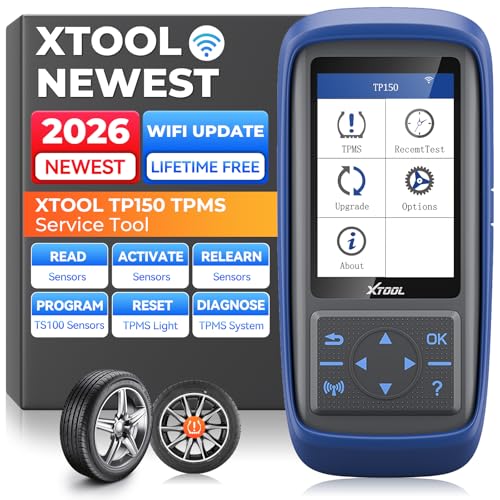
Quick Verdict
The XTOOL TP150 is a dedicated TPMS service tool, not a general full-system OBD2 scanner. XTOOL verifies TPMS sensor activation, programming, relearn, and system diagnosis, with support for 315 MHz and 433 MHz sensors. It can also display sensor ID, pressure, temperature, and battery condition on supported sensors. At our current Amazon snapshot of $159.00, it makes the most sense for users who actually service tire-pressure monitoring systems rather than buyers looking for broad engine, ABS, SRS, or bidirectional diagnostics.
Affiliate disclosure: As an Amazon Associate, Scan Tool Compass earns from qualifying purchases.
Check current XTOOL TP150 price on Amazon →
Key Specifications
| Area | Verified information |
|---|---|
| Product class | Dedicated TPMS service tool |
| Sensor activation | Supported TPMS sensor activation |
| Programming | XTOOL TS100 programmable sensors; up to eight in supported workflows |
| Relearn | TPMS relearn procedures documented |
| Diagnosis | TPMS system status and fault-code checks |
| Frequencies | 315 MHz and 433 MHz |
| Sensor data | ID, pressure, temperature, and battery condition on supported sensors |
| Updates | PC or Wi-Fi software update workflows documented |
| Price snapshot | $159.00 USD; time-sensitive |
What the TP150 Can Do
XTOOL positions the TP150 around the complete TPMS service workflow: activate sensors, inspect their information, diagnose TPMS faults, program supported replacement sensors, and perform relearn procedures when the vehicle and sensor type are supported.
That makes it fundamentally different from a basic OBD2 scanner. Its value is concentrated in tire-pressure monitoring work rather than broad vehicle diagnostics.
Sensor Activation and Data
XTOOL confirms TPMS activation for supported sensors and documents display of sensor ID, tire pressure, temperature, and sensor battery condition. Those data points can help identify a weak or failing sensor before replacing parts blindly.
Coverage still varies by sensor type and vehicle, so the existence of 315 MHz and 433 MHz support should not be read as a guarantee for every TPMS sensor on the market.
Programming: Know the Sensor Scope
XTOOL specifically documents programming for its TS100 programmable sensors, including workflows that can program up to eight sensors. That is useful, but it is also an important limit.
We do not describe the TP150 as a universal programmer for every aftermarket TPMS sensor. If you plan to use a different sensor brand, verify compatibility before purchasing.
TPMS Relearn and Diagnosis
XTOOL documents TPMS relearn procedures, including OBD and sensor-triggered workflows where supported. Relearn is the process that lets the vehicle recognize the correct sensor IDs or positions after sensor replacement, wheel rotation, or other TPMS service.
The TP150 can also check TPMS status and fault codes. As with all vehicle-specific service functions, the exact workflow depends on the year, make, model, and TPMS design.
Important Limitations
- Not a broad scan tool: Buy it for TPMS work, not as a replacement for a full-system OBD2 scanner.
- Programming scope matters: First-party documentation specifically verifies XTOOL TS100 programming, not universal programming of every sensor brand.
- Coverage varies: Sensor activation and relearn depend on vehicle and sensor type.
- TPMS-only value: If you rarely service sensors, a more general diagnostic tool may give you more everyday value.
Best For
- DIY users who regularly replace or service TPMS sensors.
- Tire shops and small repair operations that need activation and relearn tools.
- Users working with XTOOL TS100 programmable sensors.
- People who need sensor pressure, temperature, ID, and battery-status information.
Who Should Skip It
Skip the TP150 if your main goal is Check Engine diagnosis, ABS/SRS scanning, full-system module access, or bidirectional component testing. This is a specialized TPMS tool. If TPMS is only an occasional issue, consider whether a broader scanner with limited TPMS functions better matches your workload.
Related Buying Paths
Start with our guide to what OBD2 scanners can actually diagnose if you are unsure whether your problem belongs to TPMS or another vehicle system. You can also browse the TPMS Tools category as more verified models are added.
Related Reading
Explore This Topic
Methodology & Sources
This review uses XTOOL first-party product pages and official product material. Programming, activation, and relearn coverage should be checked for the exact vehicle and sensor before purchase.
- XTOOL TP150 official product page
- XTOOL TP150 official product information
- XTOOL TP150 official product flyer
The Practical Takeaway
The XTOOL TP150 has a clear job: TPMS activation, diagnosis, programming, and relearn. It is a strong fit when tire-pressure sensor work is common enough to justify a dedicated tool. Its biggest buying caveat is sensor-programming scope—XTOOL specifically verifies its TS100 ecosystem, so do not assume universal aftermarket sensor programming.