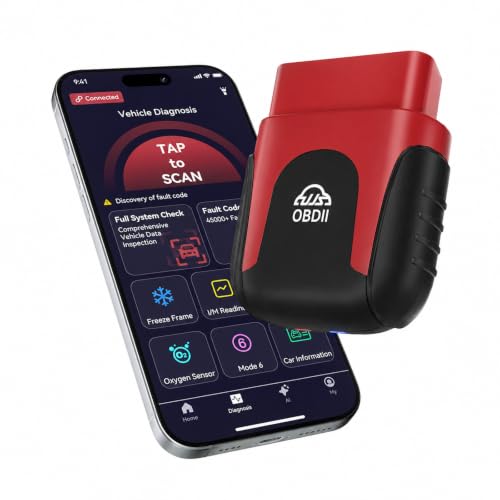
Research-based review: This article is based on first-party VDIAGTOOL documentation and the current Amazon catalog snapshot. We have not hands-on tested this unit.

Quick Verdict
The VDIAGTOOL D100 is a phone-based Bluetooth diagnostic tool with verified full-system diagnostics, bidirectional control, 17 maintenance functions, CAN-FD support, and lifetime free updates. Its roughly mid-budget positioning makes it interesting for advanced DIY users who want more than standard OBD-II without buying a large dedicated tablet. The main caution is J2534: VDIAGTOOL documents it as a separate paid/optional path, so it should not be treated as free ECU programming included with the base D100.
Affiliate disclosure: As an Amazon Associate I earn from qualifying purchases.
Check current VDIAGTOOL D100 price on Amazon
Key Specifications
| Verified positioning | Bidirectional Scan Tool |
|---|---|
| Verification status | READY_WITH_CAVEATS |
| Verified fact 1 | VDIAGTOOL identifies D100 as a Bluetooth full-system and OBD2 diagnostic tool for iOS/Android. |
| Verified fact 2 | VDIAGTOOL documents bidirectional control and 17 maintenance functions. |
| Verified fact 3 | VDIAGTOOL states lifetime free updates and supports CAN FD. |
| Verified fact 4 | VDIAGTOOL documents a separate paid/optional path for J2534-related functionality rather than treating it as included programming. |
| Current Amazon price snapshot* | $129.99 |
| Primary ASIN | B0GD7R5KFP |
*Price and availability can change.
What It Can Do
VDIAGTOOL identifies the D100 as a Bluetooth full-system and OBD2 diagnostic tool for iOS and Android. That means the intended use extends beyond generic engine/emissions data when the connected vehicle supports the relevant module access. The manufacturer also documents bidirectional control, allowing supported actuator commands to be used as part of diagnosis.
- VDIAGTOOL identifies D100 as a Bluetooth full-system and OBD2 diagnostic tool for iOS/Android.
- VDIAGTOOL documents bidirectional control and 17 maintenance functions.
- VDIAGTOOL states lifetime free updates and supports CAN FD.
- VDIAGTOOL documents a separate paid/optional path for J2534-related functionality rather than treating it as included programming.
Bluetooth Workflow, Active Tests, and 17 Maintenance Functions
The D100 uses a phone or tablet rather than a dedicated diagnostic tablet. That can make the hardware compact and easy to keep in a vehicle, while the phone provides the display and app interface. Whether that workflow is better than a standalone scanner depends on how often you diagnose vehicles and whether you prefer using your personal device in the shop.
VDIAGTOOL lists 17 maintenance functions, but the number alone is not the buying decision. Check the exact reset or relearn you need for the exact vehicle. The same rule applies to bidirectional tests: manufacturer support is vehicle/system dependent rather than universal.
Lifetime Updates and CAN FD
VDIAGTOOL states lifetime free updates for the D100 and also documents CAN-FD support. Those two points are meaningful for ownership: one affects long-term software cost, while the other matters for diagnostics on newer network architectures. Neither should be interpreted as a guarantee of every future vehicle or function.
J2534: Do Not Confuse Optional Support With Included Programming
This is the most important caveat in the D100 evidence set. VDIAGTOOL documents a separate paid/optional route for J2534-related functionality. The base D100 should therefore not be advertised as including free ECU programming. Programming workflows can also require OEM software, subscriptions, compatible hardware, stable power, and vehicle-specific procedures.
Important Limitations
- Vehicle/system/function coverage varies and the manufacturer tells buyers to check vehicle coverage.
- Do not state that J2534 programming is included free; the official workflow requires additional purchases/software.
- Do not turn broad percentage/model-count claims into a guarantee for a specific vehicle.
Best For
- Advanced DIY users who want verified full-system diagnostics and supported active tests in a compact Bluetooth format.
- Buyers who value lifetime updates and CAN-FD support at a lower price than many dedicated professional tablets.
- People comfortable using an iOS/Android device as the primary diagnostic interface.
Who Should Skip
- Technicians who prefer a completely self-contained scanner with its own screen and battery.
- Anyone buying specifically for J2534 programming without budgeting for the separate hardware/software path documented by VDIAGTOOL.
- Buyers who have not checked vehicle-specific module, active-test, and maintenance-function coverage.
Alternatives
Compare the D100 with other verified active-test tools in Best Bidirectional Scan Tools and Best Bidirectional Scan Tools Under $500. If you prefer a dedicated device rather than a phone-based workflow, the XTOOL D5 review provides a useful contrast.
Methodology & Sources
We used VDIAGTOOL official product documentation to verify the diagnostic scope, active-test support, maintenance functions, update policy, CAN-FD support, and J2534 caveat. Amazon data is used for current listing identity and price snapshot. Manufacturer sources are research evidence only and are intentionally not clickable from the public article.