Research-based review: We have not hands-on tested this unit. Our assessment is based on Innova first-party documentation, current Amazon marketplace data, and comparison with other verified full-system scanners.
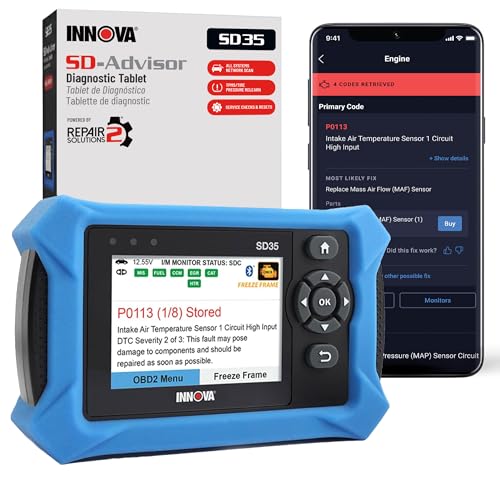
Quick Verdict
The Innova SD35 is an all-systems OBD2 tablet aimed at users who want broader vehicle coverage than a basic handheld reader. Innova verifies comprehensive system scanning that includes Check Engine, ABS brakes, SRS airbags, and TPMS on supported vehicles, plus real-time/live-data tracking. At our current Amazon snapshot of $149.99, it is positioned as a relatively accessible way to move into broader module diagnostics.
Affiliate disclosure: As an Amazon Associate, Scan Tool Compass earns from qualifying purchases.
Check current Innova SD35 price on Amazon →
Key Specifications
| Area | Verified information |
|---|---|
| Product class | All-systems OBD2 tablet |
| Check Engine | Supported vehicle diagnostics verified |
| ABS | Supported vehicle diagnostics verified |
| SRS / airbags | Supported vehicle diagnostics verified |
| TPMS | Supported vehicle diagnostics verified |
| Live data | Real-time/live-data tracking verified |
| Vehicle-specific functions | Coverage varies; use Innova coverage resources |
| Price snapshot | $149.99 USD; time-sensitive |
What “All Systems” Means Here
Innova positions the SD35 as an all-systems OBD2 tablet. The first-party page explicitly highlights Check Engine, ABS, SRS, and TPMS coverage on supported vehicles. That is broader than a basic code reader and broader than a four-system scanner when the exact vehicle exposes additional supported modules.
However, “all systems” should not be read as a promise that every module, reset, or special function exists on every year/make/model. Innova itself treats vehicle coverage as conditional.
Live Data
Innova confirms real-time/live-data tracking. Live data can help users move beyond stored fault codes by watching current sensor or module parameters while a problem occurs.
The usefulness of live data depends on which parameters the vehicle exposes and whether the user knows how to interpret them. It is diagnostic evidence, not an automatic repair answer.
ABS, SRS, and TPMS Coverage
The SD35’s verified coverage includes ABS brakes, SRS airbags, and TPMS on supported vehicles. Those systems are common reasons DIY owners outgrow generic OBD2 readers.
Before buying for one warning light, confirm the exact vehicle in Innova’s coverage resources. A platform can support a system broadly while individual vehicles expose different functions.
Important Limitations
- Coverage is vehicle-dependent: Do not assume every module is available on every model year.
- Do not infer service resets: Our verified brief does not establish a broad reset/relearn list for the SD35.
- Active-test specifics: Do not assume a particular bidirectional test, coding function, or calibration is supported on your exact vehicle. Check Innova's current coverage checker and the precise model listing before buying.
- Tablet format may be unnecessary: Buyers needing only engine or ABS codes can spend less.
Best For
- DIY users who want broader module coverage than basic OBD2.
- Owners troubleshooting ABS, SRS, TPMS, and Check Engine warnings.
- Users who value a tablet interface and real-time data.
- Buyers willing to verify vehicle-specific coverage before purchase.
Who Should Skip It
Skip the SD35 if your needs stop at generic engine diagnostics. Also skip it if your main requirement is a specific maintenance reset, ECU coding function, or bidirectional active test that Innova has not explicitly confirmed for your vehicle.
Alternatives
The Innova 5210 is a lower-tier option with verified Check Engine and ABS scanning plus battery/charging tests. The Innova 5410 is another verified all-system option with live data and graphing. If a specific bidirectional actuator test is required, confirm support for that exact operation on your vehicle; compare the Innova 5610 and other tools using current manufacturer coverage information.
Related Reading
Explore This Topic
Important US/Canada and Software-Update Checks
Innova’s own SD35 product FAQ says this scanner is intended for vehicles in the United States and Canada, and warns that it does not operate outside those countries except for a stated exception involving some US-imported vehicles in Mexico. Buyers outside North America should not assume the device will work based only on the generic OBD2 label.
Innova also says SD35 diagnostic software updates are free with no subscription required. The optional RepairSolutions2 app is free and can add guided recommendations, but the scanner’s core functions do not require using that app. Software policy and service coverage are separate questions: verify the exact vehicle, feature, and model year before buying.
- North American owner: check your exact vehicle and functions using Innova’s coverage checker.
- Buyer outside the US/Canada: treat regional restrictions as a reason to verify eligibility before ordering.
- Need an active test or special reset: do not infer it from the words “all system”; verify the operation for your VIN/year/make/model.
Manufacturer source check: Innova SD35 official product FAQ and coverage notes; verified October 8, 2026.
Methodology & Sources
This review uses Innova’s first-party SD35 product information. Vehicle-specific module and function support should be confirmed before purchase.
- Innova SD35 official product page
The Practical Takeaway
The Innova SD35 is a useful bridge between basic handheld readers and more expensive professional diagnostic tablets. Its value is broader system access and live data at a moderate price, but the buying decision should still start with exact vehicle coverage—not the phrase “all systems” by itself.